What's new
Photoshop Gurus Forum

Welcome to Photoshop Gurus forum. Register a free account today to become a member! It's completely free. Once signed in, you'll enjoy an ad-free experience and be able to participate on this site by adding your own topics and posts, as well as connect with other members through your own private inbox!

How do I put a thin 1px rectangle around an image?


ibclare: nearly there

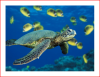
see what i've been able to make (thanks to ur instructions)

Green-Sea-Turtle.png

1. first problem is obvious: how do i get the right and bottom lines?
i'm using pencil as the stroke - i can choose many others, like brush - but none of these seems relevant!

2. the problem, unless i've missed something, is that i manually have to hit the picture dead centre!
hmmm... so far i like this solution best - but don't like having to manaully judge this part!

let me know where i'm going wrong

spruce: honest, ur solution was great - ur time given to make the post was most appreciated
if i can't get the other method to work - then i know i won't go wrong with ur solution
 
You seem to be missing the point! If you had of said exactly what you wanted, and what you wanted it for, it would have saved me the time I spent doing it, telling you something which you already know.

To be honest, it seems like you need to watch a few tutorials on working with vectors in photoshop, ie, using the pen tool, paths etc. Why are you guessing the center. there is buttons for aligning the image. good luck.
 
It doesn't look like you're using my instructions though.

You should be able to stroke the entire rectangle with one order (so to speak).

As for hitting dead centre, not entirely sure what you mean but you can set up the guides and follow them if that is the problem you're having. Are you drawing it yourself with the pencil or with the pen tool? I still am not sure what your method is here.

What is so easy about using the rectangular shape tool set to paths is that you can define the exact size and have it draw from the dead centre of the image. Then you can stroke it from the edit menu and don't have to choose a tool, just set a pixel width. That's all; it's that simple.
 
guys: i've cracked it now :)

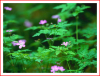
see my works of art:

Green-Sea-Turtle.png

Forest-Flowers.png

method:

create new layer (something i didn't know u could do using those keyboard shortcuts - thanks clare)
expand canvas
ctrl a, select all
select - modify - border
choose 1px if u want what 1 px like i did
now fill the border with the colour of ur choice!

if anybody needs to urgently hire a professional 1px outliner - give me a shout!

thanks for all the replies

off to bed now - it's now 5.30am in uk!!!

EDIT: actually... i just had a look at those pics - that outline doesn't look 1px to me??? more like 2px?? oh well!!!!
 

Back
Top