What's new
Photoshop Gurus Forum

Welcome to Photoshop Gurus forum. Register a free account today to become a member! It's completely free. Once signed in, you'll enjoy an ad-free experience and be able to participate on this site by adding your own topics and posts, as well as connect with other members through your own private inbox!

How is this effect created? (and what is it called?)


Daniel Smith

New Member
Messages
2
Likes
0
Hi all,

Firstly I'd like to say Hi to everyone, I am a newbie. And I'm immediately after help!

Is there a way of creating this effect in photoshop or is there a better program for it?

Excuse the random picture but its the best example I could find!
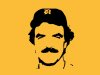
tom-selleck-tshirt.jpg

I'd basically like to be able to turn a photo into a black and white outline just showing the main detail.

Thanks in advance

Dan
 
Hey buddy. What photoshop version are you using? Since Version 6 Vectoring images has been a whole lot more advanced and the tools more elaborate and dynamic.

Then I can give you the quick way (Mid-quality) or the long way (High-Quality) in making what are called: "Vector Images."

db1machine
 
Use the threshold command under images. You can also use the poster edges filter under filter>artistic. Use a zero for poserization. The go to layer effects. Pick blend if, Hold down alt key and click on right slider under blend if grey this layer. Move the halves independently until you get the level of clear or grey which you want. Then create a layer underneath and merge these. So unless you want some of the grey to stay, threshold is obviously easier. Pretty much same result.

Aunty_Clare_Orig.jpgAunty_Clare.jpgAunty_Clare_2.jpg
 

Back
Top