kamepi_chan
New Member
- Messages
- 2
- Likes
- 0
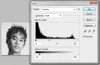
Hey guys :3 I've been really curious about this certain effect and I wanted to try it out if I can do it and... I'm close but I'm missing that 'oomph'.The effect that I want to achieve is this black and white photo. It's originally from a korean website called NATE. And they switch to different pictures based on news each day.  Anyway, I found the same photo and tried to do it on my own. I refine masked it and all these other stuff but something is clearly missing. The photo above has... depth(?), I guess you can say, and I was wondering what effect should I use to get that look?
 Here is what I have right now. And you can see that the hair is lighter and more define in the photo above than on mine. What else should I do?
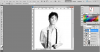 Hope you guys can help me! Thanks~!
Anyway, I found the same photo and tried to do it on my own. I refine masked it and all these other stuff but something is clearly missing. The photo above has... depth(?), I guess you can say, and I was wondering what effect should I use to get that look? Here is what I have right now. And you can see that the hair is lighter and more define in the photo above than on mine. What else should I do?Hope you guys can help me! Thanks~!