What's new
Photoshop Gurus Forum

Welcome to Photoshop Gurus forum. Register a free account today to become a member! It's completely free. Once signed in, you'll enjoy an ad-free experience and be able to participate on this site by adding your own topics and posts, as well as connect with other members through your own private inbox!

How to do this effect


Ash_KatyCAT

Member
Messages
7
Likes
0
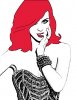
I've been curious at how to do an effect like this:

1.png
This is taken from Katy Perry's 'The California Dreams Tour 2011' Logo

howtoeffect.png
This is another image. This is from the cover of Katy's 'Teenage Dream: The Complete Confection'

Really want to learn how to do this!
Thanks!
 
it looks like a combination of vector art, and an actual photograph with a threshold adjustment applied

for the vector art you actually need to draw the shapes, and color it in, just like any digital painting

for the rest of the image they just took a picture into photoshop, and hit image>adjustments>threshold, and dragged the slider far to the left
 
I agree with dirty there. The lines are of different width and quality and probably are manually adjusted. You can make a reasonable facsimile just using Photoshop, but you will need to do some of it by hand. In this example, I used the poster edges filter instead of threshold. Threshold is great for this but it didn't work well with this image. Then I used levels to heighten the white; played around with the gamma and blk a bit -- a custom threshold sorta. Then I used the eraser because the poster edges give you more edge than you want. Also used it to erase some face detail. Selected and inverted the hair, did a pen tool tracing and filled it with color and gave it a stroke. The eyes weer a 30% brush green with a round eraser to restore the pupil. The lips are vector, created with the pen tool -- tracing -- and filled.

Anyway, it's a start toward what you want; if you want to do it yourself. I think :mrgreen:

katy2.jpg
 
Last edited:
In fact I wouldn't rule out the possibility that it is a drawing, at least in part if not completely. The lines in the hair look very much like a watercolor brush or ink pen.
 
it is a high key portrait over edited in photoshop and the colours boosted for the face. even the dress is probably real photo just contrast and slight thresh hold applied probably had a filter similar to find edges applied and the hair is painted in afterwards.
 
that's essentially what I did with the levels right? produce a high key version.

I still think there's some extra work done to the details of the hair; that's not from a photograph; it's absolutely comic book . . .
 
yes it is traced over original hair with some detail then filled with colour that is solid
 

Back
Top