What's new
Photoshop Gurus Forum

Welcome to Photoshop Gurus forum. Register a free account today to become a member! It's completely free. Once signed in, you'll enjoy an ad-free experience and be able to participate on this site by adding your own topics and posts, as well as connect with other members through your own private inbox!

How to set forms to original state?


Marcelo N

Member
Messages
14
Likes
0
Hello guys.

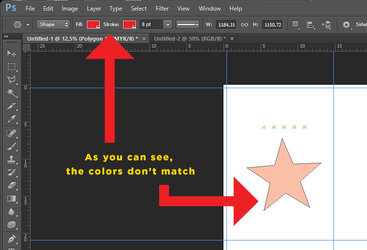
I was working on an art and suddenly I don't know how I messed up the settings of the shapes.
I mean, It doesn't get the alive color as usual.
Can anyone help?

Thanks in advance.

MN

Photoshop.jpg
 
What happens if you delete this star polygon layer and create a new one with the proper color/shape settings? If this does not change, please screen shot your entire Ps workspace!

Also, this document is in CMYK and the other is RGB...............is this on purpose?

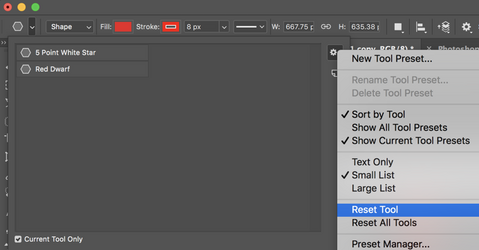
Have you tried resetting the tool? Click on the drop down menu arrow next to the Polygon Tool icon in the upper left hand corner. The click on the drop down menu arrow next to the gear icon in the upper right hand corner of the ui window, then select "Reset Tool".

Screen Shot 2026-09-27 at 10.34.41 PM.png
 
What happens if you delete this star polygon layer and create a new one with the proper color/shape settings? If this does not change, please screen shot your entire Ps workspace!

Also, this document is in CMYK and the other is RGB...............is this on purpose?

Have you tried resetting the tool? Click on the drop down menu arrow next to the Polygon Tool icon in the upper left hand corner. The click on the drop down menu arrow next to the gear icon in the upper right hand corner of the ui window, then select "Reset Tool".
Hello IamSam.

I just restarted the software and it was resolved.
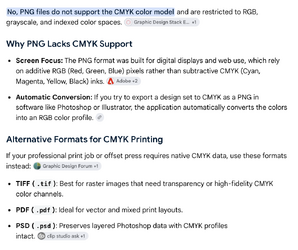
Now I can't save the art on png format, I mean, on "save as" there's no this saving option of format anymore.
Why is that?

Thanks in advance.

MN
 

Back
Top