
Photoshop Gurus Forum
Welcome to Photoshop Gurus forum. Register a free account today to become a member! It's completely free. Once signed in, you'll enjoy an ad-free experience and be able to participate on this site by adding your own topics and posts, as well as connect with other members through your own private inbox!
You are using an out of date browser. It may not display this or other websites correctly.
You should upgrade or use an alternative browser.
You should upgrade or use an alternative browser.
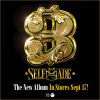
How was this created? (Gold Beveled)
- Thread starter Heczia
- Start date

These might help:
http://www.photoshopessentials.com/photoshop-text/text-effects/gold/
http://www.photoshoplady.com/tutorial/perfect-gold-text-effect-in-photoshop/6209
http://www.photoshoptutorials.ws/ph...nspirational-3d-gold-text-photoshop-extended/
http://www.developertutorials.com/t...ol-photoshop-gold-text-effects-tutorials-564/
http://www.photoshopessentials.com/photoshop-text/text-effects/gold/
http://www.photoshoplady.com/tutorial/perfect-gold-text-effect-in-photoshop/6209
http://www.photoshoptutorials.ws/ph...nspirational-3d-gold-text-photoshop-extended/
http://www.developertutorials.com/t...ol-photoshop-gold-text-effects-tutorials-564/

SPWA
Power User
- Messages
- 445
- Likes
- 298
The style tutorials above are a good place to start. I agree they aren't as complex as the album cover, but I severely doubt you will find a tutorial on how to make that. They are still PS Styles, and styles are only as complex as you make them.
Try the tuts, learn what each of the settings does while creating a Layer style. Experiment with them. You won't get what you're after straight away, but you will eventually get there.
As for the shape of the object, you will most likely need to use the pen tool to create the basic shapes to work with.
Try the tuts, learn what each of the settings does while creating a Layer style. Experiment with them. You won't get what you're after straight away, but you will eventually get there.
As for the shape of the object, you will most likely need to use the pen tool to create the basic shapes to work with.


dv8_fx
Retired Administrator
- Messages
- 12,219
- Likes
- 3,713
You may not find a Photoshop tutorial that may cover all the aspects of creating this.
But if you search around for MANUAL AIR-BRUSH TECHNIQUES, you might find something that can give you more insights. It's just a matter of incorporating the procedure into the PS workflow.
Why manual airbrushing? That image can be created by a highly skilled airbrush artist. In the old way, you have to cut out the object mask layers as well as airbrush the solid and hilite colors. It's the same manner by which we do it in PS.
But if you search around for MANUAL AIR-BRUSH TECHNIQUES, you might find something that can give you more insights. It's just a matter of incorporating the procedure into the PS workflow.
Why manual airbrushing? That image can be created by a highly skilled airbrush artist. In the old way, you have to cut out the object mask layers as well as airbrush the solid and hilite colors. It's the same manner by which we do it in PS.

ibclare
Queen Bee
- Messages
- 9,890
- Likes
- 4,028
I sure do agree with all the above advice. What you want to emulate is like a combination of all the tuts in Alexi's 3rd link. I like Deke's tutorial best (which is not one of teh above and may only be available to lynda.com members ... )which many people have copied in part and posted as their own. But his is more complex. Even so, it wouldn't be what you want. I can't see doing these effects unless, like dv8 said, you use manual techniques, particularly brushing highlights along selection edges. Sometimes we only discover a method through trial and error, but the existing tuts will get you on your way. Just consider that 1, this is an advanced technique to reproduce in Photoshop, and 2, as suggested it may be done with illustration, not graphic software.
In any event, we would love to see what you come up with, even if you don't consider it exactly what you want or totally finished. Some of these things require being put away for awhile and coming back to evaluate them at a later time. Especially if we're still experimenting and learning. Good luck and please return to display your progress.
In any event, we would love to see what you come up with, even if you don't consider it exactly what you want or totally finished. Some of these things require being put away for awhile and coming back to evaluate them at a later time. Especially if we're still experimenting and learning. Good luck and please return to display your progress.