Hello Guys,
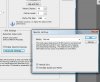
for some reason i am getting a 2-3 px thick grid line and its making my designing process a little annoying here is a picture of whats actually happening. see the vertical grid line its supposed to be 1px thick but its not.

Does anyone know how can i fix that?
for some reason i am getting a 2-3 px thick grid line and its making my designing process a little annoying
here is a picture of whats actually happening. see the vertical grid line its supposed to be 1px thick but its not.Does anyone know how can i fix that?