What's new
Photoshop Gurus Forum

Welcome to Photoshop Gurus forum. Register a free account today to become a member! It's completely free. Once signed in, you'll enjoy an ad-free experience and be able to participate on this site by adding your own topics and posts, as well as connect with other members through your own private inbox!

I need help with RGB and CMYK colors


ubaldo2003

Member
Messages
6
Likes
0
Good Evening,

I need help getting the CMYK color codes from an RGB file.

I need the codes to be as close as possible.

Thank you soo much!
 

Attachments

  • RGBtoCMYK.jpg
    RGBtoCMYK.jpg
    17.2 KB · Views: 19
If you're trying to convert rgb to cmyk for printing, it's important to keep in mind that rgb has a much wider gamut of colors available than cmyk so there are quite a few colors that just won't reproduce in traditional 4 colour printing. The settings below will get you just about as close as you can get without trying to adjust individual colors after conversion.

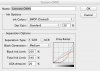
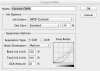
Try changing the default cmyk settings - edit/color settings to this:
cmyk_conversion.jpeg
When you load color settings, under "working spaces" click and hold "cmyk" and then "custom cmyk" at the top while you're holding. That will allow you to change the settings and save them.

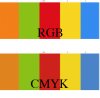
Here's how they look after conversion:
conversion.jpg
As you can see the cmyk swatches all look a little muddy; like they all need some of the "grey component" taken out. For example, the most noticeable is the blue swatch. It looks like it need yellow taken out but there is no yellow in it.

Hope that helps.
 

Attachments

  • cmyk_conversion.jpeg
    cmyk_conversion.jpeg
    121.4 KB · Views: 16

Back
Top