
Hi
I'm used to using Photoshop but have a terrible eye for this sort of thing. Got two images. One is an original that I've found on the web and one is a colour washed version in lower fidelity. I like the washed version as it invokes feelings of an era and I'm trying to do something similar for a website I'm redesigning - it'd fit the design ethos nicely (washing a larger clouds pic without a plane). Can anyone tell me what they think has been done to turn image 1
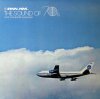
into image 2?
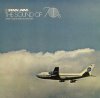
For bonus points, can anyone tell me how I might be able to turn a generic pic into pic 2 (as I can see image 1 is processed already).
Any help would be really appreciated
I'm used to using Photoshop but have a terrible eye for this sort of thing. Got two images. One is an original that I've found on the web and one is a colour washed version in lower fidelity. I like the washed version as it invokes feelings of an era and I'm trying to do something similar for a website I'm redesigning - it'd fit the design ethos nicely (washing a larger clouds pic without a plane). Can anyone tell me what they think has been done to turn image 1
into image 2?
For bonus points, can anyone tell me how I might be able to turn a generic pic into pic 2 (as I can see image 1 is processed already).
Any help would be really appreciated


