What's new
Photoshop Gurus Forum

Welcome to Photoshop Gurus forum. Register a free account today to become a member! It's completely free. Once signed in, you'll enjoy an ad-free experience and be able to participate on this site by adding your own topics and posts, as well as connect with other members through your own private inbox!

Image "wheel"


Connolly

Member
Messages
6
Likes
0
Hi,

I'm having trouble completing an image as I can't make the first layer appear above the last but still below the rest to create a continuous wheel effect. I've attached two files, the psd is how far i've gotten through and the jpeg is how i want it to finally look. You can see on the complete file that what I mean.

Cheers in advance.
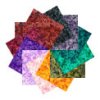
 

Attachments

I looked at your psd, so the colors below refer to that.

Put a layer mask on the yellow layer and mask off the part that the gray-ish square is supposed to be covering. I would use the polygonal lasso tool for that so that you can get absolutely straight lines.

Hope that helps
 
That is one way to do it, but not the way I used to. I have to make hundreds of these things for my website and they all need to be identical. I used to be able to just make the 1st layer/image appear above the last but still below the rest somehow, just can't remember how!
Thanks for the reply though, hopefully someone else will be able to point me in the right direction.
 

Back
Top