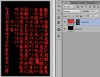
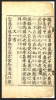
Hello
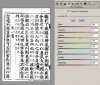
I have an image I am trying to extract from its white background using the Magic Wand Tool. When I have highlighted the white background and pressed the Delete key, the white background turns grey (as I think it should do):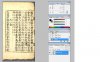
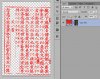
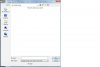
As I understood it, I then needed to import a transparent image (exactly the same size as the original manuscript image) using File | Paste. So, I have created a transparent image in a folder called photoshop_test, but when I go to File | Place, Photoshop only looks for files with non-too-common formats whereas mine is a JPEG:
What am I doing wrong, please?
Thanks.
I have an image I am trying to extract from its white background using the Magic Wand Tool. When I have highlighted the white background and pressed the Delete key, the white background turns grey (as I think it should do):
As I understood it, I then needed to import a transparent image (exactly the same size as the original manuscript image) using File | Paste. So, I have created a transparent image in a folder called photoshop_test, but when I go to File | Place, Photoshop only looks for files with non-too-common formats whereas mine is a JPEG:
What am I doing wrong, please?
Thanks.