What's new
Photoshop Gurus Forum

Welcome to Photoshop Gurus forum. Register a free account today to become a member! It's completely free. Once signed in, you'll enjoy an ad-free experience and be able to participate on this site by adding your own topics and posts, as well as connect with other members through your own private inbox!

Looking for someone to edit an image for me


ldotrules

Member
Messages
7
Likes
0
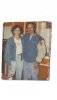
Hi, a good friend of mine passed away a few weeks ago, and I have a picture of her and her husband from 20 years ago that I would like edited to be part of a small memorial I am putting together for him in her memory. I have been trying with Photoshop for the last 2 weeks, and I just can't get it right! Is there someone able to edit the image for me?

Thank you,
Leslie
 
Absolutely.

Post in photoshop forum below - either general or newbies - and let us know what you want. It might not let you attach a picture without a certain number of posts, but you could upload to Photobucket or something similar.

I'm sorry for your loss.
 
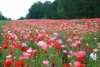
Jackie and Jim.jpg jackie field of roses.jpg

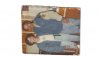
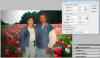
Here is the original image...I would like to remove them and place them in the field of roses photo, and also touch up the areas of the picture of them.....I'm not sure what else you need to know from me, but please let me know if anything. Or, if I need to post them differently or somewhere else??
 

Attachments

  • 01-19-2012 04;06;42PM.jpg
    01-19-2012 04;06;42PM.jpg
    149.8 KB · Views: 2
View attachment 13846 View attachment 13847

Here is the original image...I would like to remove them and place them in the field of roses photo, and also touch up the areas of the picture of them.....I'm not sure what else you need to know from me, but please let me know if anything. Or, if I need to post them differently or somewhere else??

Your info will do.

The only thing is your "flower field" image may be too small in resolution size and too low a tree/skyline.

Do you have an alternate field picture? Or is this the kind of flowers you need?
 
The photo of the roses isn't a "must have" - any picture/background with red/pink roses as they were Jackie's favorite flower.
 
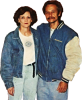
i thought i would post my edit of the couple in case anyone wants to try adding it to the flowers.
dont have time right now to continue (still needs a bit more work)
couple.png
 
Quick question is someone could answer for me...I tried to resize the image (using image --> resize) to a 4in h x 6 in w, but it won't allow it...when I put 6 in for the width, it automatically changes the height to 2.764 in. And, vice versa, if I put 4 in for the height, it automatically changes the width to 8.683. My opening in the mat for this photo is 4in h x 6 in w. "???
 
you have constrain proportions on the crop of the photo is not 6x4 you will need to crop it down and transform it if you dont and you turn of constrain proportions then your image will be distorted.
 
Or you can change the Canvas Size, which is under "image." That is how you actually change the size of the photo. Otherwise as Hoogle said you are changing the proportions and distorting the figures. The background can then be transformed to fit the increased size of the "frame."
 
if you open up the crop tool and in the top bar it gives you an option to put in the size you want

type in 6 inch and then 4 inch for height and it will scale it down for you as close as possible.
cap 1.PNG
 
I guess as with all things in PS, there is more than one way to do something. What Hoogle refers to with the crop tool didn't even occur to me. It won't distort your picture, just crop it to the exact size you want. Playing with canvas size is a different story.

Funny I didn't consider it since it was not realizing that my crop tool was set to 1 px by 1px that brought me to the forum in the first place.
 

Back
Top