What's new
Photoshop Gurus Forum

Welcome to Photoshop Gurus forum. Register a free account today to become a member! It's completely free. Once signed in, you'll enjoy an ad-free experience and be able to participate on this site by adding your own topics and posts, as well as connect with other members through your own private inbox!

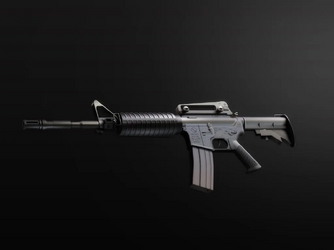
M4A1 Carbine


Sean

Guru
Messages
652
Likes
0
Yippe, I love Christmas break! Cause I finally got time to shop around, uhh...I mean photoshop around.? 8} Anyway, I worked on this most of yesterday and today, and It was fun making it. I did use? some pics I found of the web to use as a guide though.
All PS, baby! :)

m4a1.png
 
PATRICK! Really nice job. Very realistic. ;)
 
p?tr??k, Wow that is a fine bit of work. I might not be a huge fan of the subject, but I sure as hell love your attention to detail. And ron, I'm still waiting for some Zbrush texture tricks!
 
oops, I clean forgot about that. I'll get to work on it after Christmas. I have some new PS stuff as well for generating textures [saywhat] Heres an example if a textured model made in PS and the finished piece made from that model, If you like the effect and want to know how th do it, let me know..
 
Great job there Pat!,
But I'm with sCync, there is only one reason to use one of those things and nothing good can come from it
 
Hey ron, I consider you the texturemeister 'round these here parts. Always interested in any little pearls that you can convey.
 
Hey guys, thanks for all your comments! [excited] Maybe you guys might have an idea of what I could do next... I really want to crank out some more illustrations, but I don't know what to create next. \:/
And, ron, I'd love to here your technique. [honesty] I'm always looking for ways to upgrade.
 
So Patrick..when you're in the holiday spirit you think of assault weapons..Valentine day or ground hog day should muster up some great images..can't wait!

Lasa
 
lasa said:
So Patrick..when you're in the holiday spirit you think of assault weapons..Valentine day or ground hog day should muster up some great images..can wait!

Lasa
:bustagut: No, I was looking at airsoft guns, and the idea just came to me. It is my favorite weapon in Counter Strike: Source though. I just thought it would be fun. I guess the subject doesn't really agree with everyone, but I'm pretty sure none of you think I'm pshyco in the head or something. [honesty] I hope...
Red, thanks buddy! :)
 
Actually it looks great... must have taken a good amount of time to do..!
Just giving you grief keep up the good work..!
Lasa
 
Thanks. It took, I think about 10-12 hrs. I counted all the layers and I came up with 218. My only regret is that I didn't start at higher resolution. Most of the layers are vector, but not all so it would be difficult to resize it and retain detail. :{
 
p?tr??k said:
Thanks. It took, I think about 10-12 hrs. I counted all the layers and I came up with 218. My only regret is that I didn't start at higher resolution. Most of the layers are vector, but not all so it would be difficult to resize it and retain detail. :{

Great work p?tr??k !
I am sorry, I know how it feels! Never do it again. ;)
 
Patrick, about all of those layers. You may want to consider this. When I do an illustration, I do them as elements. say for example; the rifle stock, working on a transparent background, start and finish that 'element' then save as a .png. to a folder or desktop. Open a 'new' window and go to work on another element. You can open the various elements and move them around at will without having to deal with all the accompanying layers. If you save them as .png and as .psd's, they, of course, will be editable. I do some pretty complex things, but seldom ever work with more than 4 or 5 active layers. Also, when you save the elements as .png's they retain the gradients and don't flatten out the way rasterizing can do. When you bring the elements back in they're no longer active, which means you can apply shading from different angles without effecting the existing angles. Same goes for bevels. As you know, not all shadows and hilights eminate from the same light source.

 
Thanks for the tip, ron! Though, I think I'd work on about 30-+ layers at a time, being as most of the 'elements' are 30-40 layers. The barrel, for example is about 30 layers. I go about by starting at one end and refining as I go. I make a shape, and a layer style, then move on to the next shape. Afterwards I add speculare highlights and shadows. ( I almost never use layer styles shadows) After I'm all done I add some minute texture and tweak the lighting and color. The reason I rasterized alot of the layers is because of exactly what you said, ron, " you can apply shading from different angles without effecting the existing angles" For example, bevel and emboss doesn't act realistic. Realisticly there are small highlights around certain parts of the edges, so I use the dodge tool and lighten up little corners. I don't really mind working with a lot of layers as long as it doesn't slow down my comp to much.
One other thing...I've heard in Illustrator, there is a feature called "live trace" that traces shapes and converts to vectors. If so, I could do that with my gun, reaply the styles and be able to resize it witout all the edges become all pixelated. To bad I don't have the program. :(
Thanks for your help :)
 
Patrick, that's true with Illustrator however, if you manage to retain vector quality lines, be prepaired to work in a pretty high ppi in PS, They will still rasterize once in the bitmap environment plus they will rasterize anyway once you save to .jpg-.tif-.png and on and on. I've heard people claim that PS will maintain vector shapes but I've yet to discover how when the most common file formats don't. You may be able to, saved as an EPS. If someone knows how to save a vector .jpg, please jump in ( H E R E ).
 
Exceptional work p?tr??k, regardless of the subject material. You seem to have a specific technique that you employ with this, the IPod and even your coffee cup avatar. Could you perhaps do a little tutorial on how you made the coffee cup, for example? It would be much appreciated - for the upliftment of the masses!
 
Hey, doodad. I've accually been meaning to write a tut on how to make a photorealistic eye, but I've been too lazy to find the time to do it. [honesty] I do want to make a bunch of tuts though. Just send me a IM every now and then telling me to get of my butt! ;) As far as technique goes, it's kinda like monkey see, monkey do. I find something to basicly 'copy' then draw it in PS. I always start looking at things to notice reflections, shadows, perspective, certain elements that make it look realistic. One technique that I can tell you is tweaking. Each sperate part or element I create in PS, I spend along time tweaking the color, gradient, shadow, reflection, etc to get it JUST right. Sometimes I think I spend too much time on one part. [honesty]
Hope that helps you understand a little bit more...untill I make some tutorials. ;)
 
Ok p?tr??k, it's a deal - I'll keep those IM's coming until you give in and write that tutorial! :P

Of course you are correct though - observation is key - I am very often guilty of trying to "think" of how something should look, instead of using a real object as reference. Hopefully it's just me ....
 

Back
Top