What's new
Photoshop Gurus Forum

Welcome to Photoshop Gurus forum. Register a free account today to become a member! It's completely free. Once signed in, you'll enjoy an ad-free experience and be able to participate on this site by adding your own topics and posts, as well as connect with other members through your own private inbox!

Marquee tool vs Rectangle tool borders


espronceda

New Member
Messages
2
Likes
0
When I use the Marquee tool, or the single row marquee I have perfect borders in my forms, but when instead I use the rectangle tool, the line tool or the elipse tool I have these strange borders that are not well delimited.

I have already deleted the default settings, but still continues the same.
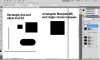

Captura.JPG

Thanks for your help.
 
Welcome to PSGurus, espronceda.

I'm not sure why but I have that pixelation when I use the shape tools and I'm zoomed in to the document and the image resolution is 72. That's what happens to me . But when I'm at normal view, it never happens.

Let's see what the others say....
 
Screenshot: left side rectangle tool with anti-alias, right side same only w/o anti alias.
 

Attachments

  • ScreenShot001.jpg
    ScreenShot001.jpg
    10.4 KB · Views: 0
Thank you kawkeye, that was the issue. I've been looking for the problem for quite a long time. For those who want to remove the anti-aliasing on shapes, this is what i've found on google:


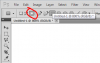
Firstly you set the shape mode to "fill pixels", you can't turn AA off with shape layers:
aa1.png


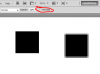
Secondly you need to uncheck the "Anti-alias" checkbox (this only appears after you do the first step)


aa2.png


Here I am zoomed in to 800%. The rectangle on the right was drawn with AA on, the rectangle on the left was drawn with AA off.


graphicdesign.stackexchange.com/a/1813


Back
Top