Hi everyone,
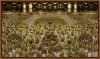
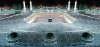
I would be greatful of any advice that would enhance this image that I have worked sporadically on for the past two years. The artwork is a depiction of Mecca made entirely out of imagery sourced from call centre workplaces. It's a very large image (it will be about 8 foot wide when printed.) My main concern is that the image looks a little 'flat' and there is not enough definition between foreground, midground and background. I think the artwork should resemble the original image that inspired it a little more - with more contrasting lighter and darker areas, so the illusion of movement and density is increased. Hopefully I can upload both images here on this thread. Also I thought there should be some shadows placed in the foreground and wondered if anyone had any good tips on how I would go about creating them. I'm competant with using layers, but have never used masks and wondered if anybody had any advice on how I can gently make the image get gradually darker towards the horizon line. In addition any other advice would be greatfully received.
I would be greatful of any advice that would enhance this image that I have worked sporadically on for the past two years. The artwork is a depiction of Mecca made entirely out of imagery sourced from call centre workplaces. It's a very large image (it will be about 8 foot wide when printed.) My main concern is that the image looks a little 'flat' and there is not enough definition between foreground, midground and background. I think the artwork should resemble the original image that inspired it a little more - with more contrasting lighter and darker areas, so the illusion of movement and density is increased. Hopefully I can upload both images here on this thread. Also I thought there should be some shadows placed in the foreground and wondered if anyone had any good tips on how I would go about creating them. I'm competant with using layers, but have never used masks and wondered if anybody had any advice on how I can gently make the image get gradually darker towards the horizon line. In addition any other advice would be greatfully received.