
What's new
Photoshop Gurus Forum

Welcome to Photoshop Gurus forum. Register a free account today to become a member! It's completely free. Once signed in, you'll enjoy an ad-free experience and be able to participate on this site by adding your own topics and posts, as well as connect with other members through your own private inbox!

More Photoshop CC Questions


Rich54

Guru
Guru
Messages
2,003
Likes
3,877
A few more unrelated questions:
  • I'm now using version 27.7.0. Is there a way to freeze this version against the future rollout of new versions? Once I reach a certain comfort level with CC, I would prefer to keep my version static and not be constantly surprised whenever Adobe decides to change something. Can I do this?

  • The Selection Brush tool is new to me and I just viewed a tutorial about it. I see very little difference between this and the old Quick Mask tool, which I had in CS5. But surprisingly, Photoshop CC still has the Quick Mask tool. Why both? What does one do that the other can't?

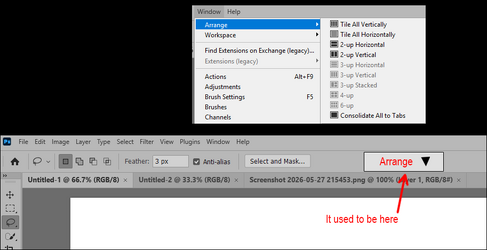
  • If I want to tile multiple files, I need to go to Windows>Arrange. In CS5, this control used to sit on the menu bar, like in the bottom image below. Is there any way to have the Arrange features permanently on the desktop?
Thanks again.


1779934309375.png
 
A few more unrelated questions:
  • I'm now using version 27.7.0. Is there a way to freeze this version against the future rollout of new versions? Once I reach a certain comfort level with CC, I would prefer to keep my version static and not be constantly surprised whenever Adobe decides to change something. Can I do this?

  • The Selection Brush tool is new to me and I just viewed a tutorial about it. I see very little difference between this and the old Quick Mask tool, which I had in CS5. But surprisingly, Photoshop CC still has the Quick Mask tool. Why both? What does one do that the other can't?

  • If I want to tile multiple files, I need to go to Windows>Arrange. In CS5, this control used to sit on the menu bar, like in the bottom image below. Is there any way to have the Arrange features permanently on the desktop?
Thanks again.


View attachment 153816
For turning off autoupdate:
In Creative Cloud Desktop:
  1. Open Creative Cloud Desktop
  2. Go to Apps
  3. Choose More actions / …
  4. Choose Manage auto-updates or Preferences > Apps
  5. Turn Auto-update OFF for all apps, or for specific apps
For the masking. They are heavily overlapped with pros and cons fo each. Here is a summary:
A useful analogy:


Quick Mask = editing a mask document​

You temporarily work on a grayscale mask.
Very flexible.
Very “Photoshop power user.”

Selection Brush = painting marching ants​

You directly manipulate the selection boundary.
More streamlined.
More approachable.

So use the one you like to use.

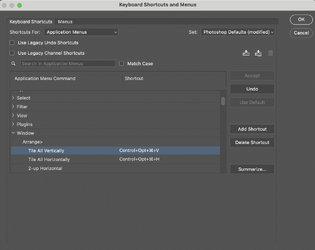
For the Arrange problem, I don't know of an easy fix. One option to consider is assigning a keyboard shortcut for the top arrange options as shown in my screenshot below.

Screenshot 2026-05-27 at 10.26.40 PM.png


Hope that helps
John Wheeler
 

Back
Top