What's new
Photoshop Gurus Forum

Welcome to Photoshop Gurus forum. Register a free account today to become a member! It's completely free. Once signed in, you'll enjoy an ad-free experience and be able to participate on this site by adding your own topics and posts, as well as connect with other members through your own private inbox!

Need abit of help


Jax

New Member
Messages
2
Likes
0
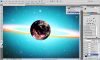
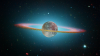
Im trying to make the planet go behind the ring, yet in front of the background if you know what i mean? As if the ring is around the planet.
Only been using around 3 hours so sorry if its obvious
 
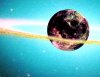
I made a selection from the left hand side ring of asteroids, using quick mask then pasted that over the top of the planet warped to fit duplicated to give depth.
Other ways can get similar results.

sky.jpg
 
Here's another way...

Hit the D key on your key board. This returns your foreground and background colors to a default setting of black and white.
Add a layer mask to the moon layer.
Select the layer mask by clicking. Make sure the white brackets are around the Layer mask.

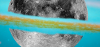
On the layer mask use your Brush Tool set to black and a soft brush to harshly expose the ring.
Screen Shot 2014-02-17 at 9.43.37 PM.png

Then change your color to white, lower the Brush Tools flow to 4%.
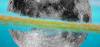
Begin to carefully bring back the moon right up to the edge of the overlying ring. Don't get too close.
Screen Shot 2014-02-17 at 9.50.05 PM.png

When done, lower the flow of the Brush Tool to 1% and the opacity to 25%.
Work the edges of the ring and some inside very carefully.
Also notice I gave the Moon a slight bluish hue as well using a Hue & Saturation layer set to colorize.
Screen Shot 2014-02-17 at 9.52.06 PM.png

Still could use some work but it's close.
RingedMoon_01.png
 

Back
Top