Re: Need help on how to convert photos to black and white drawings, Grunge style or a
Since I'm not sure exactly what you want, I did this anyway. Logical, right?
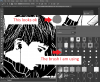
Applied two metal textures masked into my selection. I played with blends, using the metal texture you see above, then creating a repeating pattern from a texture I found just by googling metal textures. When transformed down to the picture size, it still wasn't a small enough dot, so I duplicated the layers till I had the coverage I needed. It could also be done as a defined pattern. In fact I made two metal texture patterns, but I used this one just as a masked pattern layer.
For the first metal texture I used hard light. For the dot pattern I used vivid light blend mode. Then on another layer, I painted with a soft brush in white using the control click selection method, then set the layer to overlay.
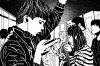
I just realized that I lost the lines. To remedy that, I made a copy of the original image selecting only the ceiling and pole. I moved this over everything except the highlight layer and set blend mode to soft light 65%, then duplicated it. I also increased the highlight layers and added one for sharp highlights set to vivid light.
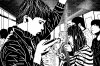
I'm getting the impression that this much detail and contrast/darkness is overwhelming the image, so I would personally tone that down ... a lot. The people are more important than the ceiling. After all, lol.
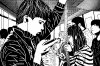
Sort of like this, turning down a few opacities. Maybe even more.
OK, that's enough out of me, since you might not even be home yet to defend yourself against the onslaught!