What's new
Photoshop Gurus Forum

Welcome to Photoshop Gurus forum. Register a free account today to become a member! It's completely free. Once signed in, you'll enjoy an ad-free experience and be able to participate on this site by adding your own topics and posts, as well as connect with other members through your own private inbox!

Need help to recreate styles and effects as at the photo.


gas-animanga

New Member
Messages
4
Likes
2
Hi,

I am planning to do a report on a subject of 2 countries Thailand and China. I have found a nice image with nice font on the internet and I wish to do it in the same manner but do not know how(especially concerned about curved text and flag pattern). Here is a picture I want to recreate but with another background and different text.
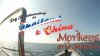
Lrg_Thailand_and_china_video.jpg

The font has already been identified as Falkner Pro (RMU) on myfont.

Many thanks.
 
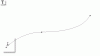
select pen tool and draw a path for the text to follow
3.gif

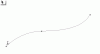
Then select the text tool and hover it over the beginning of the path so that the cursor changes to text path cursor
2.gif

Then type your text
1.gif

And apply it by pressing enter.

Pick your picture of a flag and place it on the layer above your text, right click the layer and say create clipping mask Job done
 
Many thanks,Hoogle.

These small gifs are very comprehensive, I hope you did not spend a lot of time on doing them.

I have a question regarding flag layer, will it curve along the line with the text?

I am also curious about how to make a white imprint or shadow around the text.

Thank you.
 
No The gifs are actually from an Ebook I have was just reading it last night and thought they would work for your post lol.

The flag will need to be warped if you want it to be realisticly fixed to the text
 
As promised

Thailand-and-China---Copy.jpg

This is a result of my work. I have attached a psd file as well. View attachment Thailand and China - Copy.psd

Many thanks again to Hoogle for introducing clipping mask tool and warp function. Btw warp was tough, I could not get the lines of flag symmetrical. But eventually after 3 hours of hard work I've come to this result. Not exactly the same as at the reference picture but very close I suppose.

In case you have spare time please have a look at my picture and tell me how I can improve it.

Many many thanks again.
 
select pen tool and draw a path for the text to follow
View attachment 18391

Then select the text tool and hover it over the beginning of the path so that the cursor changes to text path cursor
View attachment 18392

Then type your text
View attachment 18393

And apply it by pressing enter.

Pick your picture of a flag and place it on the layer above your text, right click the layer and say create clipping mask Job done

THAT. IS. FREAKING. AWESOME!!! I've been using PS for about 8 years now and never knew you could do that. It opens whole realms of artistic possibilities.
 

Back
Top