

mtnlivin23
New Member
- Messages
- 3
- Likes
- 0
So, I'm attempting to stitch a panorama shot in Rocky Mountain National Park using Photomerge. Upon reviewing the "final" stitch, there only appears to be one issue of problematic color differences in snow tones, which does not seem too difficult to fix. My problem is that when I flatten the image and adjust the levels of the entire image, I end up with a very apparent "seam" in the sky (far right side in the sky), though upon closer inspection of the "pre-flatten" stitch, it's not actually a stitch seam at all (the "seam" I'm seeing is in the actual image...). I opened the original single image and tweaked the levels, but the same anomaly doesn't appear, so my brain is saying that it's some form of "artifact" left over from the stitch blending, but if that's the case, how do I fix it if it's not visible before I merge flatten the image? Attached is the flattened image, with the anomaly being in the far right in the sky (above snow tone differentiation) It's a faint but obvious difference in the blue hues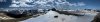
Is this something I should be fixing solely in the final flattened image (being that It's not visible pre-flatten...), and if so, how do I go about creating a "seamless" blue sky in that portion of the image?
Is this something I should be fixing solely in the final flattened image (being that It's not visible pre-flatten...), and if so, how do I go about creating a "seamless" blue sky in that portion of the image?

