What's new
Photoshop Gurus Forum

Welcome to Photoshop Gurus forum. Register a free account today to become a member! It's completely free. Once signed in, you'll enjoy an ad-free experience and be able to participate on this site by adding your own topics and posts, as well as connect with other members through your own private inbox!

Ok I'm Lost In This Video. Can Someone Help Me Out?


i just skipped to that part of the video and it looks like she opened two documents one with custom size (and black default BG) and another of some stock image, then she made a render out of the stock image, cut it and pasted it to her original document.

EDIT: i just saw your comment asking the same question :)
 
No. Not sure what u are saying...I followed all the steps in the video but the black background doesn't appear on my bottom corner like it does in the video @ 1:25. I want to know what I am doing wrong. Do u have any idea? It'll be easier for u if u watched the whole video. It's only a minute long till you get to the 1:25 point.
 
The Black Background was in another document. She cut the person out of her current document and pasted it in a new document.
 
Ok I tried but how comes mines doesn't look like that on 1:25?

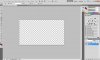
Look @ the layer and look at the bottom corner, how come it only has layer and no "background" like that video?
Snap9.jpg
 
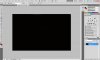
And here is what it looks like when I go to the other document...All it says is background? It's suppose to say Layer 1 and background on the bottom right corner...
Snap10.jpg
 
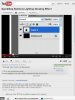
WHat I want is for it to look like this on the bottom right corner like the youtube videos..Here is a snapshot of the youtube video @ 1:25..
Snap11.jpg

^You see how it says layers and background? How do I get that?
 
Just a note: the video says it is not for beginners. And making a new layer and a background layer are beginner steps in Photoshop.

That being said, when you open a new document, there is a default Layer called Layer 1. To convert that to a background layer, go to the tool bar, go to Layer > New > Background from Layer. After that, to get a layer above your new background layer, you can go to that same menu Layer > New > Layer.
 
having it say background wont change anything.
just leave it how it is and fill it with black.
then create another layer and add your image to it but if your copying the image over it will create a new layer for you when you paste it.
 

Back
Top