
This is how my Photoshop CS6 (64-bit) looks
h t t p://i.imgur.com/Pi5ELSp.jpg
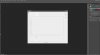
This is my 'Preferences' window, as you see the text is missing and it just generally looks weird as crap. That's the same with all the windows etc. I have no idea why this is happening.
It worked fine before.
Then I added my old fonts because I was setting up this new PC (1k+ fonts) and then I got this problem.
I already tried re-installing Photoshop several times, deleting configs and restarting my computer but nothing seems to help and the problem persists...
I really hope someone can help me, because I am a graphic designer and absolutely need Photoshop.
h t t p://i.imgur.com/Pi5ELSp.jpg
This is my 'Preferences' window, as you see the text is missing and it just generally looks weird as crap. That's the same with all the windows etc. I have no idea why this is happening.
It worked fine before.
Then I added my old fonts because I was setting up this new PC (1k+ fonts) and then I got this problem.
I already tried re-installing Photoshop several times, deleting configs and restarting my computer but nothing seems to help and the problem persists...
I really hope someone can help me, because I am a graphic designer and absolutely need Photoshop.

