
Photoshop Gurus Forum
Welcome to Photoshop Gurus forum. Register a free account today to become a member! It's completely free. Once signed in, you'll enjoy an ad-free experience and be able to participate on this site by adding your own topics and posts, as well as connect with other members through your own private inbox!
You are using an out of date browser. It may not display this or other websites correctly.
You should upgrade or use an alternative browser.
You should upgrade or use an alternative browser.
Photoshop RAW Menu Changed
- Thread starter Bad Matt
- Start date
- Messages
- 3,383
- Likes
- 3,112
Hi @Bad Matt
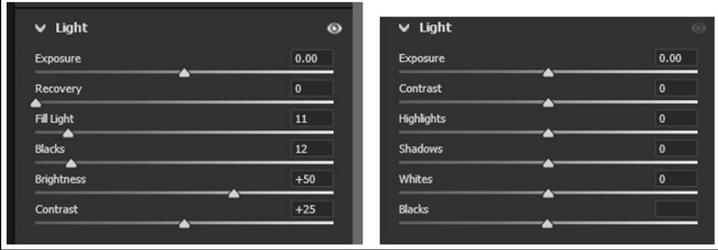
Could you share which version of Photoshop or ACR is being used for each of them?
The one on the left I think, is a very old version of ACR, such as Pre ACR 7, and the most recent version is 16.x
I am sure you will find many more differences.
John Wheeler
ADDED NOTE: No you cannot toggle between them if it is the old version on the left above.
Could you share which version of Photoshop or ACR is being used for each of them?
The one on the left I think, is a very old version of ACR, such as Pre ACR 7, and the most recent version is 16.x
I am sure you will find many more differences.
John Wheeler
ADDED NOTE: No you cannot toggle between them if it is the old version on the left above.
Last edited:

Bad Matt
Member
- Messages
- 5
- Likes
- 0
Let me clarify the question.
This is the same version/release, the there is not earlier version or older version.
Release 27.2.0
One time it opened using one menu, the next time it opened used the other menu.
This menu swapped has occured twice.
I assumed you have a toggle somewhere.
I just purchased this program a little over a week ago.
This is the same version/release, the there is not earlier version or older version.
Release 27.2.0
One time it opened using one menu, the next time it opened used the other menu.
This menu swapped has occured twice.
I assumed you have a toggle somewhere.
I just purchased this program a little over a week ago.
- Messages
- 3,383
- Likes
- 3,112
Thanks for that clarity @Bad Matt
I think I know what is going on.
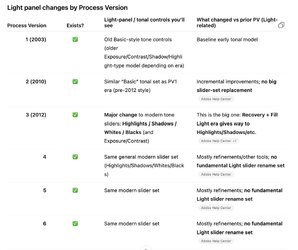
Adobe ACR has six process versions, each with changes to the various panels.
Process versions 1 and 2 had the old Light Panel sliders on the left image.
Process versions 3 through 6 include the Light Panel sliders for your right image.
Images processed in ACR retain information about which process version was used to adjust them. When you open an image created with Process Version 1 or 2, it will display the old ACR Light Panel (I think that was through ~2012).
Images processed in versions 3 through 6 use the newer light panel, and when you open those images, the sliders will reflect that.
You can take an image adjusted with older process versions and change it to a newer process version. Adobe does not allow reverting an image file to an earlier process version.
You can take an image and move it from Process Version 1 or 2 to use the new sliders, but you cannot take an image from Process Version 3 to 6 and change it back to Process Version 1 or 2.
So you cannot switch back and forth. You can only change an image to a higher process version, not back.
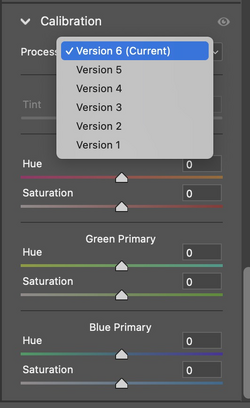
To know what version the image is using or to change the version number is found in the Calibration Panel of ACR (or the Camera Raw Filter in Photoshop.
So the changes you see were based on what type of image was being opened and what process version it is tied to rather than the version number of Photoshop
Not sure I communicated clearly enough about this issue so ask more questions if it was confusing.
Attached is a summary of the process version and what happend with the Light Panel in each version
Hope this is helpful
John Wheeler
I think I know what is going on.
Adobe ACR has six process versions, each with changes to the various panels.
Process versions 1 and 2 had the old Light Panel sliders on the left image.
Process versions 3 through 6 include the Light Panel sliders for your right image.
Images processed in ACR retain information about which process version was used to adjust them. When you open an image created with Process Version 1 or 2, it will display the old ACR Light Panel (I think that was through ~2012).
Images processed in versions 3 through 6 use the newer light panel, and when you open those images, the sliders will reflect that.
You can take an image adjusted with older process versions and change it to a newer process version. Adobe does not allow reverting an image file to an earlier process version.
You can take an image and move it from Process Version 1 or 2 to use the new sliders, but you cannot take an image from Process Version 3 to 6 and change it back to Process Version 1 or 2.
So you cannot switch back and forth. You can only change an image to a higher process version, not back.
To know what version the image is using or to change the version number is found in the Calibration Panel of ACR (or the Camera Raw Filter in Photoshop.
So the changes you see were based on what type of image was being opened and what process version it is tied to rather than the version number of Photoshop
Not sure I communicated clearly enough about this issue so ask more questions if it was confusing.
Attached is a summary of the process version and what happend with the Light Panel in each version
Hope this is helpful
John Wheeler
Bad Matt
Member
- Messages
- 5
- Likes
- 0
Oh, I think I know what might have affected Release 27.2.0
I also have CS5 on my computer.
I could not get the magic wand to work in Release 27.2.0
so I used CS5 to edit a photo.
I am using Release 27.2.0 for all my editing. Unless the task is easier with CS5.
Could CS5 have changed the menu?
I also have CS5 on my computer.
I could not get the magic wand to work in Release 27.2.0
so I used CS5 to edit a photo.
I am using Release 27.2.0 for all my editing. Unless the task is easier with CS5.
Could CS5 have changed the menu?
Last edited:
- Messages
- 3,383
- Likes
- 3,112
Yes.Oh, I think I know what might have affected Release 27.2.0
I also have CS5 on my computer.
I could not get the magic wand to work in Release 27.2.0
so I used CS5 to edit a photo.
I am using Release 27.2.0 for all my editing. Unless the task is easier with CS5.
Could CS5 have changed the menu?
If you used ACR with CS5, it uses the Light Panel with Recovery, etc. The ACR version with PS CS6 and above uses the newer Light Panel in ACR.
This can happen another way as well. If you. Save a raw file with the ACR edits when using CS5, and subsequently open that same file in a newer version of Photoshop in ACR, the older Light Panel will show up in ACR.
Hope that helps
John Wheeler
- Messages
- 3,383
- Likes
- 3,112
HI @Bad Matt
Your welcome.
Just know that if you open such file with 2026 in ACR or the Camera Raw Filter, you can go to the Calibration Panel and change the Process Version of the image so it uses the most recent version of the Light Panel. So it does not "forever" change which Light Panel is used for that image. You just have to change the Process Version
John Wheeler
Your welcome.
Just know that if you open such file with 2026 in ACR or the Camera Raw Filter, you can go to the Calibration Panel and change the Process Version of the image so it uses the most recent version of the Light Panel. So it does not "forever" change which Light Panel is used for that image. You just have to change the Process Version
John Wheeler

- Messages
- 3,383
- Likes
- 3,112