
What's new
Photoshop Gurus Forum

Welcome to Photoshop Gurus forum. Register a free account today to become a member! It's completely free. Once signed in, you'll enjoy an ad-free experience and be able to participate on this site by adding your own topics and posts, as well as connect with other members through your own private inbox!

Please help on how to make a top and side view of an image in Photoshop


sampson

New Member
Messages
2
Likes
0
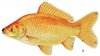
Please can someone help me out here, I have a fish image downloaded online and I want to use it to design a fish in CINEMA 4D and animate it but before using that on CINEMA 4D I need to take this image to PHOTOSHOP and extract the top view and save it as a separate image and also extract the side view and save it as a separate image too but my problem is that I don’t know how to get the top view and the side view of a photo or image, please can one kindly help me out here.
The attached file is the sample of the fish image that I want to take out the top and side view and save them separately
 

Attachments

  • 866295716.jpg
    866295716.jpg
    451 KB · Views: 0
If that's all the image you've got, there's no way to extract a top view unless someone here has the patience of a saint and ability to manually create one.

But here's what you can do...... If you can identify the fish, you can make a search for download freebie 3d models (maybe 0bj format which can be imported into C4d). I've seen that kind before but in Poser format dunno if C4d can import that format.

Or open in PS 3d .....

Another option would be HOOGLE, our C4d expert who might offer a better idea.....
 
Thank you for such a fast response, what a fast reply with great quality, I have googled that with the information that you gave me and have downloaded some beautiful fish that I am able to open in CINEMA 4D as if I created them ahahahaah! , then I can start from there, what a great value your information, you can’t imagine how long and the stress that I have gone through this until you rescued me all together, thank you a lot and may God bless you in the most part that you needed, never any of your effort be in vain.
 

Back
Top