
What's new
Photoshop Gurus Forum

Welcome to Photoshop Gurus forum. Register a free account today to become a member! It's completely free. Once signed in, you'll enjoy an ad-free experience and be able to participate on this site by adding your own topics and posts, as well as connect with other members through your own private inbox!

Print colors are really wrong when letting Photoshop manage colors


wetsignal

New Member
Messages
1
Likes
0
Ok, I've searched the internet and cannot find the answer to my particular problem. I have owned an Epson 3800 for years now and have not had problems printing in the past. I let PS handle colors and use the correct profile, turn off printer color management, etc. and all has been well. But yesterday I tried to print after a long hiatus and found that when I let PS handle the colors they turn out lighter with strong color shifts in certain areas. When I let the printer handle it they seem fine (though unexceptional). Oh, and the same thing happens when I try to print from Lightroom 3. Below illustrates the problem (I am using Hahnemuhle Photo Rag Bright White 310 gsm, Photoshop CS5, Windows XP Pro) I've already tried reinstalling the driver, the paper profile, etc. It happens on other paper's drivers too, so I think it has to do with the print driver or come conflict therein (I've also tried the original driver that shipped with the printer). Is the driver neglecting to turn off the printer managed color even though I'm telling it to?:

Here is a screen shot of the main view within PS:
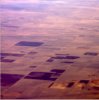
ps-view.jpg

Here is the print dialog view (yes, I've tried different rendering intents, with/without BP Comp):
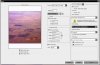
print-dialog-view.jpg

Here are the printer settings showing that printer management has been turned off:
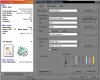
printer-settings-view.jpg

Here is where it goes wrong, the Epson preview image (which is how the hard copy looks as well):
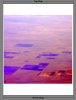
epson-print-preview.jpg

Here is what it looks like when I let the printer handle the color:
printer-managed-preview.jpg

What am I missing?! The guys on photo.net didn't really know how to help me. What is happening? I need to make prints! Thanks for any help.
 
Hello,
there is one logical question : what was changed on the computer since you have printed last time correctly ? Can you go back to that time with the computer, try it and then make the changes/installations step by step and check ? If not could you reinstall Photoshop or is there a way to recalibrate monitor ? BTW old photos look did not change ?
Best regards,P
Peter
 
Hmm perhaps you have to change the colour scheme from RGB to CMYK? :/ I don't know much about this at all, it's just a wild guess :S
 
Hmm perhaps you have to change the colour scheme from RGB to CMYK? :/ I don't know much about this at all, it's just a wild guess :S

That is a good point, since printer colours are CMYK, but it was working fine as he writes, so it would have to be changed. The same problem may be colour profile sRGB against Adobe 1998.
 
Hmm perhaps you have to change the colour scheme from RGB to CMYK? :/ I don't know much about this at all, it's just a wild guess :S
No that's not right, you use RBG when desktop printing.
From Adobe, Desktop Printing.

The first thing you need to do is calibrate your monitor.

I'm not familiar weith Epson printers or paper but in the PS Print display you've selected MK_PreBrightWhite (I don't know what that is), in the printer display you selected Velvet Fine Art Paper.
They should both display the EXACT PAPER you're printing to.
 
No that's not right, you use RBG when desktop printing.
From Adobe, Desktop Printing.

The first thing you need to do is calibrate your monitor.

I'm not familiar weith Epson printers or paper but in the PS Print display you've selected MK_PreBrightWhite (I don't know what that is), in the printer display you selected Velvet Fine Art Paper.
They should both display the EXACT PAPER you're printing to.

Couldn't agree more with Steve on this one..
In my work practice i'm using several printers, laser and inkjet and a 44" wide plotter, from the same PC and can tell how the misprint look like.
Monitor calibration is crucial, you don't have to belive your own eyes all the time:-)
if not sure what to do you should let the windows manage colors or rely on your graphic card color control application.
cmyk or rgb? you should always choose rgb, even though, i did some large prints on the canon plotter from the photoshop print driver in cmyk and rgb and there was no difference at all. they did good job in adobe on this one.
paper selection is crucial too. many companies are fighting for their piece of the market and you won't believe what they may do with emulsions just to make you use their particular paper (even of the same kind and specification).
 

Back
Top