What's new
Photoshop Gurus Forum

Welcome to Photoshop Gurus forum. Register a free account today to become a member! It's completely free. Once signed in, you'll enjoy an ad-free experience and be able to participate on this site by adding your own topics and posts, as well as connect with other members through your own private inbox!

Illustrator Proportional resize. Involves maybe a match calculation?


Oh for Chrissake!

Well-Known Member
Messages
83
Likes
7
Proportional Resize.JPG

Hi folks,

Sorry, it should say "math calculation" in the heading.

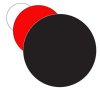
I want the red circle 1/3rd the size of the black. And I want the white 1/3rd the size of the red.

Or I can do it backwards and say I want the red 2/3rd bigger than the white, and the black 2/3rds bigger than the red (is that the right math? I suck at math.)

Anyway, outside of writing down and calculating the desired measurements longhand, and then selecting each circle to resize manually, is there some task that ILLY can perform automatically?

Thanks!

OFC.
 
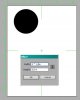
Make you first circle the size you want, then click anywhere with the ellipse tool and type in what you want. I started with a 3" circle, then typed in *1.2 to get a 3.6 inch circle.
 

Attachments

  • ScreenShot002.jpg
    ScreenShot002.jpg
    20.9 KB · Views: 7
Oh, you're using the multiply symbol. Very nice! I wish I'd thought of that. Probably works with all 4 operations (plus minus times and division).

But can you select all three at once, and have ILLY do the calculations automatically?
 
Good tip, Hawkeye. I've used AI for years, and never knew it could do simple math. I'll have to try that in PS, as well.

Thanks,

T
 

Back
Top