

- Messages
- 24,349
- Likes
- 13,740
Tutorial said:We're now going to duplicate our Layer 1.
Click on its icon in the layers palette, hold down the mouse button and drag (A) the layer to the Create a new layer iconand release the mouse button.
Easier way.........highlight/select the "layer 1" layer, hit Cmd/Cntrl + J to duplicate.
Tutorial said:The next step is to move this duplicate (that has now become the layer with name Layer 1) to the top of our layers palette; click on Layer 1 and drag (figure B) it all the way up until you notice a dark black line appearing above the top layer. At that moment release the mouse button.
Ok.... What's being said here is after you duplicate "layer 1", you will have a new layer named "layer 1 copy". Highlight/select the original "layer 1" by clicking on it once, then click on it again, hold, and drag to the top of the layers panel.
Figure B
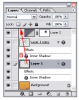
This should get you moving on that step!!
Let me know if you have any other issues.
