What's new
Photoshop Gurus Forum

Welcome to Photoshop Gurus forum. Register a free account today to become a member! It's completely free. Once signed in, you'll enjoy an ad-free experience and be able to participate on this site by adding your own topics and posts, as well as connect with other members through your own private inbox!

Removing the text


RioGrande

Member
Messages
7
Likes
0
Hi guys,

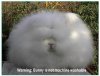
How do I remove the text from a picture like the one attached?

Thanks:)
 

Attachments

  • medium700_20090830104758_955.jpg
    medium700_20090830104758_955.jpg
    30.7 KB · Views: 15
The best way to go about this is to use a combo of the clone stamp and healing brush.

Start off with the clone brush first (use the concrete as a source point by pressing Alt while left clicking once), then "paint" over the words.
Then, where necessary, use the healing brush to blur the line between real and fake (again...left click while pressing Alt to set a source point).
I would also advise to do all these changes on a NEW layer and have the tools set to "use current layer and below". That way if you make a mistake, it won't damage the original print.
 
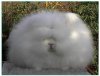
that's actually going to be slightly more difficult, because the text is directly on the border between brick and rabbit, so i recommend making your clone source include some of the rabbit, and just dragging it across slowly, and repeating over and over

here's my result
psghelprabbit1.jpg
 

Back
Top