What's new
Photoshop Gurus Forum

Welcome to Photoshop Gurus forum. Register a free account today to become a member! It's completely free. Once signed in, you'll enjoy an ad-free experience and be able to participate on this site by adding your own topics and posts, as well as connect with other members through your own private inbox!

replacate gold leaf on a diplomia?


imazephed@aol.com

New Member
Messages
2
Likes
0
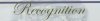
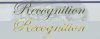
I am new here and very new to photo shop. I have searched and found links to make text look like gold leaf but not how to take text that is already there and turn it into gold leaf. This is a diploma I scanned and the word RECOGNITION is in gold leaf on the original. I would like to replicate it as close as possible on a copy but am very limited on Photoshop knowledge. I can select it with the magic wand and then paint fill it another color but the gold color I have looks like plane light yellow when I print it not even close to actual gold. I know there is way to do this but I am lost on what to do. I dont want to change anything else just the word Recognition to something that looks very close to actual gold leaf. Any help would be appreciated and please be gentle I am a total newb at Photoshop but can usually find my way around most software with a little instruction. Thanks -Jason


reconitionforgoldleaf.jpg
 
Re: Reported Post by Hoogle

I checked this out in PS and the font is standard, Edwardian Script. All he needs to do is make a nice gold color and retype it. Then just add some white highlights set to overlay. There aren't even any character/spacing changes:

recognition.jpg
 
Last edited:
You guys are good...Thanks for the help. Just curious how do you tell what font something is in? Is there some way to tell in PS? Even though it looks much better it still does not come close to actual gold leaf. I guess if I want it to look just like my originals I am going to have to find someone who does gold leaf and have them do it for me. Thanks again for the help
 
well it all depends on your original you can create your gold text and then play with blending options add some bevel and emcoss etc.
Gold.png
 
I have another technique for you to try. Here is the sample. If you like it, I will make a step by step written tutorial as I don't do videos.

GOLDtext_2.jpg

Another way you could simulate this is to get an actual photo of gold leaf, make your letters. Now put the gold leaf layer above the type layer. Hold down the alt/opt key and click your cursor between these 2 layers. This is called a clipping layer. It is kind of like a mask on both layers. All is clipped away that is not need to be seen through the letters. You can experiment with moving the gold leaf layer around or chopping up pieces of it to show through in different spots.

Font recognition. Some fonts are very recognizable having been in PS for a thousand years. Some people recognize others. You can go to a font site and search for script styles, etc. You can google the web for script fonts and compare. One of the biggest selections of fonts is dafont.com and most are free downloads (or all are free, not sure which but anyway).

Hope this helps.
 
but in all honesty if you want really good copies then you probably are better off going to somewhere that can print them
 
This actualy reminds me of creating some golden text and addables on chrismas cards and such that I use to make a very long time ago with some goldfoil or what it is being called :) you can buy that at a hobby shop or something.
I'm not sure if that is what you're looking for.

Or else, it'll be the same as spruce and hoogle mentioned, your printer will be limited to print of a good golden color and if you use it on professional base you might want to visit a printing factory or store.


Greets,
Dreamers.
 

Back
Top