What's new
Photoshop Gurus Forum

Welcome to Photoshop Gurus forum. Register a free account today to become a member! It's completely free. Once signed in, you'll enjoy an ad-free experience and be able to participate on this site by adding your own topics and posts, as well as connect with other members through your own private inbox!

Request/Help Please!


Messages
10
Likes
0
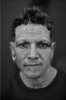
Is there any way that this photo can be changed to remove ALL of the tattoos this guy has? I mean all of them. It's a bit urgent and even if someone can't do it, any advice would be appreciated.

Thank you!
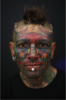

Untitled2.png
 
It's for a psychological experiment I'm running on judgement of individuals with tattoos. One group will see that picture, the other will see the same person without one, it's just doing that that's gonna be the tough part.
 
It would be, but keeping the people consistent will make for a better comparison, so that the presence of tatoos is the only thing changed, and therefore the only thing that is being judged, really.
 
Is anyone planning on helping with this? I'm not asking in a condescending way at all, I just want to know so I can start figuring out how to do it myself! I'm on a bit of a tight deadline.
 
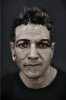
I dont mean to be harsh or condescending but in all fairness this is a massive job if you are ever going to fool anyone into believeing it is the same photo. I am working on it however as I am assuming you dont want to replace the face with anyone elses then it is going to take a while. I have done the bulk of it but unfortunately at the moment it looks like a very bad tranny gone wrong.

and there is no way I can begin to instruct how to do it I have gone from lightroom to photoshop back to lightroom in to Nik colour effex added some topaz in. recoloured it from black and white which was the best way to start add lots of cloning layers try and colour correct some more shadow highlight filters free painting some more and about 30 layers it still looks bad. and a man in drag
 
I really, really, do appreciate you trying to help and do this. I'm sorry if it was a lot of trouble, I dunno if you want to post what you have so far or scrap the whole thing... I would just hate to feel like I made you waste your time. Again, I'm very grateful for your efforts.
 
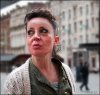
Also, for anyone else who might be up for this much easier job, I just need to add some texture to this one so she can appear un-retouched. Unfortunately I'm on my university computer so I can't do things like download brushes. Is there a way to do that without downloading brushes?

untattooed woman.jpg
 
Sorry dude I have played with it but I just cant seem to be getting it right but maybe someone else can tweak it to be better I am to tired now. and sorry but had to hand paint most of it.

mmmmm2.jpg

And I dont normally spend almost 2 hours on requests I really hope you find someone else to finish it off as I really cant do anymore now.
 
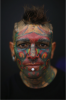
mmm not to sure about that Motochief it looks like it is painted but then it is really lol. I guess it just needs the background sorting out and some colour correction done probably converted to black and white. But someone feel free to correct it
 
Had another play unfortunately still looks to fake for your usage but I enjoyed the challenge and cant really improve any more on it been adding to it and subtracting to it so time to give up

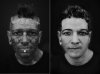
B4 and after.jpg

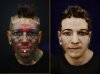
b4 after colour.jpg
 

Back
Top