What's new
Photoshop Gurus Forum

Welcome to Photoshop Gurus forum. Register a free account today to become a member! It's completely free. Once signed in, you'll enjoy an ad-free experience and be able to participate on this site by adding your own topics and posts, as well as connect with other members through your own private inbox!

Requesting help for college poster


vishnu123

Member
Messages
9
Likes
2
Hey guys , I'm currently preparing a college poster for an event that is to happen . I found some nice vector images n decided to use them in the poster . But the problem is , on upscaling , the VECTOR tends to blur !! I really don't know why that is happening . Any help will be appreciated . I've attached the psd where I've taken the floral vector at the side .

My poster size is 6614*5079 pixels . On upscaling the vector , it appears blurred . It would be nice if someone can let me know what i should do to eliminate the blur when upscaling the floral vector .

any help at the earliest will be appreciated as I have to complete this as soon as possible . Thank you :)
 

Attachments

Photoshop is unable to enlarge some thing all at once without having to guess at pixels. Because the floral design is solid color that was easy for PS, but it still mucks the edges. 72 pixels/inch is a low resolution for a poster that will be printed. It should be 300 dpi for the most part.

What size was the image before enlarging it? You have several options.You might try by going back to the original and changing the resolution first. I don't think that will solve the problem altogether. Another option is to have the design redone with a pen tool. But first increase the resolution of the document. A third option is to get a plugin which will enhance the enlargement process.

Because Photoshop is pixel based, it has problems enlarging even vector images. If you still have the path for the image, use that to recreate it. If not, it might be better to have it done in Illustrator which is totally vector based.

Hope this helps.
 
The problem is that you inadvertently turned the vector images into bitmaps at some very early point in the process. This can be seen by stripping away everything else and looking at any one of the fundamental components of your psd file. For example, the attached file shows only "Layer 25 copy2". Hit cntl-+ a couple of times and you can immediately see that it is obviously a bitmap. Double click on it, and you can see that even the mask you used for this (smart)layer is a bitmap, not a vector mask. Another dead giveaway that it's no longer vector based is that there are no paths showing up in the paths palette. Everything that I looked at has been rasterized.

Why don't you walk us through how you went from something that you thought was vector art to files such as "Layer10.psb", ie, what you get when you double click on the smart, "Layer 25 copy 2", and we'll probably be able to tell you where you went wrong.

HTH

Tom M

PS - Clair's suggestion to work in Illustrator, not PS is excellent. It has much better tools to create / modify fully vector art.
 

Attachments

Last edited:
To add to the previous comments, it can be almost impossible to work completely in vector shapes and paths in PS. For example, even if, in PS, you do something as simple as attempt to make a vector filled area by using a path to make a vector mask for a solid color layer, the initial pixel dimension that you set for your canvas will limit the maximum sharpness you can achieve. Put differently, even the fundamental operation of using a vector mask will essentially rasterize the result. With pain, one can kinda work around this limitation, but AI intrinsically doesn't have this limitation.

Tom M
 
You might try by going back to the original and changing the resolution first. I don't think that will solve the problem altogether.

The OP did say that he started with vector art, so, it's possible that he started with an AI file that he imported into PS. If this is the case, then increasing the pixel dimensions of the canvas before import would completely solve his problem. Unfortunately, my guess is that the components he started with were called "vector art" by someone else, but, in fact, were really only JPGs or some other type of bitmap.


Another option is to have the design redone with a pen tool. But first increase the resolution of the document.
I don't think he's going to like all the work implied by that suggestion. :shocked:


A third option is to get a plugin which will enhance the enlargement process.

I own the current incarnation of Genuine Fractals (aka, onOne's Perfect Resize) and, over the years, have experimented extensively with other plugins and up-rez'ing methods. In my experience, he isn't going to be happy going from his current 1600x800 to something having many times those dimensions. One usually can up-rez by 2x in both dimensions without incurring too many problems (see attached), but beyond that, it gets dicey.

The only saving grace is that because posters are typically not subjected to pixel peeping scrutiny from a few inches away, he probably will be able to get away with surprisingly low ppi values, so the required enlargement in pixel dimensions may not be as great as he thinks he needs.

If he doubles both pixel dimensions (as per the attached files), he'll be able to go up to just under 2 feet by 4 feet without it looking too bad (ie, 72 dpi). If he needs to go to a 4 foot by 8 foot poster, he could use the same 3200px by 1600px file (at 36 dpi) so long nobody is going to be able to get closer than a few feet of the poster.

The two attached files are versions of his 1600x800 image up-rez'ed to 3200x1600. One was done using Genuine Fractals / onOne Perfect Resize, while the other was done using Topaz Vivacity's special 2x-only resizer.

HTH,

Tom M

PS - Under no circumstances should you judge the quality of the up-rez'ed versions by simply viewing the preview versions displayed in-line in this thread. This forum highly compresses these previews. Instead, download each and evaluate them in Photoshop or some other competent file viewing software.

 

Attachments

  • ComingSoon-White-uprezed_to_3200x1600_Perfect_Resize.jpg
    ComingSoon-White-uprezed_to_3200x1600_Perfect_Resize.jpg
    956.4 KB · Views: 1
  • ComingSoon-White-uprezed_to_3200x1600-topaz_vivacity_2x_algorithm.jpg
    ComingSoon-White-uprezed_to_3200x1600-topaz_vivacity_2x_algorithm.jpg
    1 MB · Views: 1
The problem lies in the fact that the source file being used by the OP has been in bitmap form since he began using it. This is a free template designed by DeviantArt user amandhingra for DownloadPSD.com

The original psd files (which are exactly the same as uploaded in post 1) may be obtained from here:
http://amandhingra.deviantart.com/art/Colorful-Free-Coming-Soon-Page-181278151
http://downloadpsd.com/templates/colorful-free-coming-soon-page-psd/

The up-sizing solutions provided above by Tom are the best results which may be achieved with the source material. If a higher resolution file is absolutely necessary, I would suggest contacting amandhingra on deviantart and politely asking for it.
 
That is a common used vector image so surely you have the original vector file somewhere a simple tin eye search of your image shows it has been used multiple times just trace back to the source and start again with proper setup etc.

@rufinatti wrong image used above that was an example of rescaling
 
Last edited:
Thanks for the info on where the OP got that image. I wasn't familiar with it, but, as you confirmed, I guessed that the OP probably first got it as a bitmap, so the low-rez problem was baked in right from the start.

Tom
 
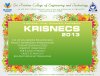
ya guys i got it from that site .. after going thru the 1st reply , I almost thot it would be impossible for me to re do it cos am still a newbie in PS :rolleyes: .. So I decided to go for another vector instead . n this is my outcome so far :)
2en9ock.jpg

This is also jus a floral vector .. twisted n pasted .. some gradients matching the whole thing .. n thats it . .

Thanks for all ur valuble comments :) appreciate ur responses :)

PS: am vishnu . . u can call me vishnu instead of OP :razz:
 
Very nice. Just one caution. Be careful in transforming any image that has been converted to pixels. Too much distortion can create fuzziness and you are trying to avoid that. But a little tweaking, no damage.
 

Back
Top