What's new
Photoshop Gurus Forum

Welcome to Photoshop Gurus forum. Register a free account today to become a member! It's completely free. Once signed in, you'll enjoy an ad-free experience and be able to participate on this site by adding your own topics and posts, as well as connect with other members through your own private inbox!

Restore Old Photo - Remove Grunge?


MsMovieMaker

New Member
Messages
3
Likes
0
I have an old photo that I'm trying to clean up but I'm running into problems removing the "grunge" that's accumulated from aging. I don't know what to call it other than "grunge". I want to keep the dark areas that make up the face but the aging is competing with the shadows of his cheek bones and underneath the chin. I'm not sure how to preserve those areas and get a clean background. Any thoughts?

I've attached the photo here, drastically reducing the original file size. Thanks in advance!
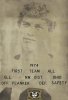
Grunge Sized.jpg
 
I wish that was the case. I scanned the photo myself. The problems were exaggerated after increasing the contrast. However, the increased contrast was needed to bring out the image.
 
I have come up with this making three adjustments, exposure, levels and blend mode. Could use curves probably instead of exposure and levels. Beyond this, you will probably have to use masking techniques and some careful brushing within the face. There are no real details, but you could remove more of the "grunge" as you call it :mrgreen:

Let me know if you want more info -- if this is moving in the right direction.
 

Attachments

  • grunge.jpg
    grunge.jpg
    252.1 KB · Views: 17
I basicly re drew the image with a fine brush on a few layers, then de saturated to overlay with original.
Could spend more time on it, good practice though.

View attachment 12540
 
Nice work Paul. I haven't had much time but here's what I did so far (again)

Haven't done anything with the lower part. Done for now though.
 

Attachments

  • grunge2.jpg
    grunge2.jpg
    168.2 KB · Views: 16
All great thoughts and suggestions! I was hoping I wouldn't have to go in with a brush but that looks like the best option.

Thank you so much for your help!
 
Make sure you do it on a mask -- well, unless you do it Paul's way that is. I'm not sure what exactly he did, but he'll explain. Anyway, if you do the brushing on a mask and make a mistake you can always change from black to white and so on. Of course if you paint, you can do it on a layer above. Both ways are non-destructive.
 
I have an old photo that I'm trying to clean up but I'm running into problems removing the "grunge" that's accumulated from aging. I don't know what to call it other than "grunge". I want to keep the dark areas that make up the face but the aging is competing with the shadows of his cheek bones and underneath the chin. I'm not sure how to preserve those areas and get a clean background. Any thoughts?

I've attached the photo here, drastically reducing the original file size. Thanks in advance!

View attachment 12526


Is that the original scan? If not, can you upload the original?
 

Back
Top