benfrance
New Member
- Messages
- 4
- Likes
- 0
Hi,
As of lately if have been working away at some of the tutorials on spoon graphic. I have come across a problem. If anyone can shed some light on what i am doing wrong, would be appreciated!
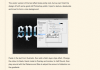
The objective of the this part of the tutorial is to give the text a satin overlay. As far as i know i have been following the tut instruction properly. However every time i have made the new satin overlay layer, nothing happens. There is no change to the appearance at all.
As of lately if have been working away at some of the tutorials on spoon graphic. I have come across a problem. If anyone can shed some light on what i am doing wrong, would be appreciated!
The objective of the this part of the tutorial is to give the text a satin overlay. As far as i know i have been following the tut instruction properly. However every time i have made the new satin overlay layer, nothing happens. There is no change to the appearance at all.