HI
@Rich54
I probably do not understand all the nuances of the "New Document" panel and its defaults. So before that, let me show you what I have in Color Settings that keeps me out of trouble (well Photoshop trouble

), Here are my settings:
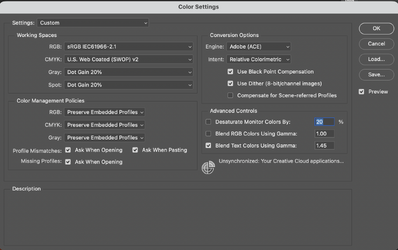
In particular, note all the Color Management policy settings, including the checkboxes. With these settings, as long as the image has an embedded ICC profile, it will keep that as you open files. In the case of pasting files, you get flagged if it has any other ICC profile (or lack of profile) that does not match the working space (which, for mine, is set for sRGB).
So when I copy a screenshot on my Mac, it attaches the display profile along with the image in the clipboard, so when I try and paste it I get this warning and option box:
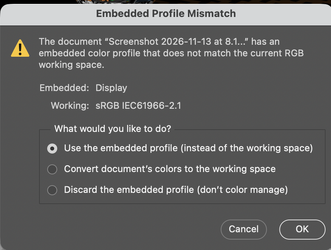
where it gives me choices on how I want to handle the mismatch. This way, I don't have to understand the nuances of the PS process; it will flag me if something does not match.
If you have an existing file available, the preferred method is to use "Open" instead of the "New" command.
So in your case (which I think I initially misread), it depends on how you got the file into the clipboard (and this may be OS dependent too).
Are you clipping a screenshot? Im my Mac it will assign the display profile (not sure about Windows systems)
If you are right clicking an image and copying on the internet, it may or may not have an assigned profile. Some have embedded profiles and others do not. e.g. some photo sharing sites strip the color profile so those would come in as not being color managed while others will come in either with however the file was saved and sometimes websites default to converting to sRGB for "better" compatibility with all viewing software. So its a mixed bag
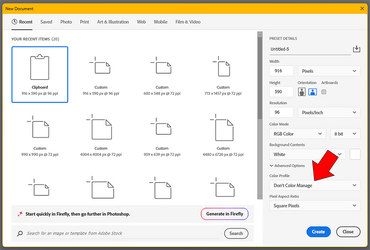
The one time that I do use the New Document panel from the clipboard is because I do not know the exact pixel dimensions and the default size comes up with what is in my clipboard. so setting up a new document, it opens up with the background selected.
II will try some things out and see how it works with my version of OS and make another post.
John Wheeler