
What's new
Photoshop Gurus Forum

Welcome to Photoshop Gurus forum. Register a free account today to become a member! It's completely free. Once signed in, you'll enjoy an ad-free experience and be able to participate on this site by adding your own topics and posts, as well as connect with other members through your own private inbox!

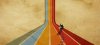
Simple colour bars perspective


owlingSounds

New Member
Messages
2
Likes
0
Hi all,

So the link to the tutorial on how to do this seems to be broken, but I don't figure it can be that hard.. has anyone got any pointers at all on how to accomplish? Would be a great help :)po11.jpg
 
Create a selection on the top half of the cone where you want the vertical colmns to meet. and hit delete. You would have something like this...

View attachment 12880


Unhide the grouped layer copies made earlier. CTRL+T and transform the layers and align them to a point in the first group where you want to create the GOING UP part... lol...

View attachment 12882
 
There's your basic for the line perspective....

To create the curve parts you'll need the elliptical selection tool and eraser tool to create the curves.

You may need to ungroup the second set in order to align the vertical columns to it's repective "mate".

Hope this helps start you off on your project...

Cheers...
 

Back
Top