What's new
Photoshop Gurus Forum

Welcome to Photoshop Gurus forum. Register a free account today to become a member! It's completely free. Once signed in, you'll enjoy an ad-free experience and be able to participate on this site by adding your own topics and posts, as well as connect with other members through your own private inbox!

Slight Blur- No matter what I do


torrendo

New Member
Messages
3
Likes
1
Hi All

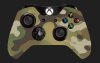
I have tried a number of different methods however I cannot seem to get rid of this problem. Every time I put together banners or any graphics/designs for that matter, whenever I save them and then display them I always end up with a slight blur. I am trying to get a really crisp finish but can never seem to get it right, please see attached photos . I have used the search but nothing has helped with my exact problem, part of it is not know what the problem is.

Any help would be greatly appreciated
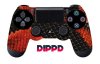
PS4_Controller_SnakeSkin_Dippd.jpgdrip_dippd.jpg

Kind Regards

Torrendo
 

Attachments

  • xbox_one_multicam_dippd.jpg
    xbox_one_multicam_dippd.jpg
    13.4 KB · Views: 21
1st of all on first look you are saving them as compressed jpegs and the file size is tiny this will loose a lot of detail and sharpness.

Png will keep much more sharpness on saving than a jpeg will.

There is a point where vector format will produce sharper results than pixel based but don't panic you can still get good results within photoshop and dont have to jump into illustrator unless of course you want to learn vector based image design as to pixel based.

work at 300 dpi all though this is recommended for print and not necessarily needed for screen work it does give your image finer pixel so more per inch.

Some colors look sharper than others or should I say some colors show defects easier than others so using web safe colors will ease the artifact and pixelation you would get in rather bright colors.
 
Forget about jpg vs png, vector vs pixel based -- those are minor factors in this case.

99.9% of your problem is simply that the pixel dimensions of the files you posted are just much too small to print them any larger than a couple of inches on a side without experiencing significant loss of sharpness.

...and, no, you can't just blow these file up in PS and hope to create edge (and other) detail that just isn't there.

T
 

Back
Top