What's new
Photoshop Gurus Forum

Welcome to Photoshop Gurus forum. Register a free account today to become a member! It's completely free. Once signed in, you'll enjoy an ad-free experience and be able to participate on this site by adding your own topics and posts, as well as connect with other members through your own private inbox!

Text style help


Zombie

Member
Messages
17
Likes
0
Having problems producing a good looking "Golf Ball" text style. does anybody have some tips or ideas? Thanks in advance!
 
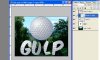
I don't know of any golf ball font. But you can do this.... Get a golf ball image.

Create a clipping layer as my capture shows. With the golfball layer above the text layer, ALT+click the heavy line between the two layers.

Gulp.jpg

There's your golf ball text style.... hope this helps.
 
Thanks! I have done that already and just doesn't look quite correct. I was wondering if there was a way to make my own texture with the dimples and shadows then apply that.
 
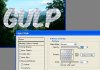
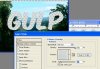
If you're patient enuf to create a tile pattern or can find a tileable golf ball pattern, use a Pattern Layer style.

OPen your tile image then MENU>EDIT>DEFINE PATTERN to create a pattern for PS. Aplly the layer style.

Gulp3 copy.jpg

My example is a shortcut, I used the golfball image ... lol... all you need is a small tile pattern ...
 
I deduce you want dimples on a flat plane. Create layer copies of a dimple you like. and move them around in the image to get the tile pattern you need. And then save as a pattern using the step outlined above.
 

Back
Top