What's new
Photoshop Gurus Forum

Welcome to Photoshop Gurus forum. Register a free account today to become a member! It's completely free. Once signed in, you'll enjoy an ad-free experience and be able to participate on this site by adding your own topics and posts, as well as connect with other members through your own private inbox!

Tight radial gradient


Zdub

New Member
Messages
2
Likes
0
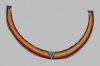
Was trying to recreate a similar tight radial gradient like the one in the attached photo. Not having a lot of luck and was hoping someone could give me some direction on how one would accomplish this look.

Zdub.
 

Attachments

  • 9025USE1.jpg
    9025USE1.jpg
    137.4 KB · Views: 3
I would say it was a stroked path not a gradient
use the pen tool to create the path arch
then in the paths tab with a soft brush and the colour you want it to be right click the work path and select stroke path using the option of the brush. This will create the arch depending on the thickness and colour that your brush was set at before you selected stroke path then right click the layer back in layer tabs and select blending options.

Choose a stroke and colour

Untitled-1.png
 
I wouldn't do it with a radial gradient. I used three layers, a gaussian blur and a layer mask. :DRadial.jpg


Edited to add: I like Hoogle's way too, but I thought you wanted a perfect arc and I can't draw a perfect arc....:wink:
 

Back
Top