What's new
Photoshop Gurus Forum

Welcome to Photoshop Gurus forum. Register a free account today to become a member! It's completely free. Once signed in, you'll enjoy an ad-free experience and be able to participate on this site by adding your own topics and posts, as well as connect with other members through your own private inbox!

Torn Text effect


gethooked

New Member
Messages
4
Likes
0
Hi all,

Thanks for taking the time to read this.

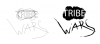
I am trying to achieve the effect below (the black "Wars" text and around the word "tribe" text) on a logo I have designed, but I do not know where to begin. Is it possible to complete this effect by simply brushing around the edges of my logo?

Thanks for any advice.

ImageUploadedByTapatalk1336229247.891576.jpg
 
It looks totally hand painted to me, and lol likely done on a tablet. It could also be scanned in if you want to do it by hand with ink on paper for instance. But that is so old school, huh?
 
Thank you all for your time and insight.

I'll check the resources you suggested and see if I can't achieve the effect. I do not have a tablet, so I guess I'll try and find a font that is close and pull out the brush tool.

Thanks again for the advice.
 
you can probably use puppet wrap to chang the shape of text and then use different brushes to smudge the edges, but i dont think the effect would be exactly like this one but with time you can get close enough.
 

Back
Top