What's new
Photoshop Gurus Forum

Welcome to Photoshop Gurus forum. Register a free account today to become a member! It's completely free. Once signed in, you'll enjoy an ad-free experience and be able to participate on this site by adding your own topics and posts, as well as connect with other members through your own private inbox!

Transform/Warp object from nodes / or path / or 3D remapping of object – HELP??


kuklinski

Member
Messages
12
Likes
0
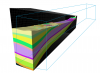
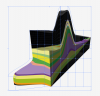
Hi.. I want to be able to transpose the perspective of the existing image to my new 3D prism shape.
Why can't I create a path.. and then drag nodes on that path.. and warp the pixels at the same time???

I hope I make sense... I want to remap this object to the new object.. but cant seem to be able to figure it out.
It should be so basic.

It shouldn't apply to just 3d.. because I should be able to draw a rigid path around anything and warp / stretch the image from those points.
:banghead::banghead::banghead::banghead::banghead:
Puppet warp doesn't appear to be the answer. Neither does Liquify.

THANKS GURUS!!!!!
:rocker::rocker::rocker::rocker::rocker:


Screen shot 2012-03-22 at 8.44.47 PM.png
 
do i need photoshop extended to do this??? why oh why? it needn't be a 3D problem... I could have any image and want to warp from nodes.
 
if you re working in 3D yes you need extended but can't you rasterize then transform?
 
duplicate the 3D layer first as to not lose your seetings
 
Thnx. No I'm not working in 3D. I have a raster image I want to transpose and distort from the node.

It could be a photo of a shoebox that I want control over dragging corner points

Else... I could mask a star over any photo and want to warp individual points dragging the image and distorting like a vector.
 
Ehe. Yes but the limited square mesh grid with the 90 degree starting point won't give me the control I need. I'll upload the images separately tomorrow so u can have a go. :)
I need to drag individual nodes out and the contet to warp. I need to dictate the nodes.
 
Last edited:
Ehe. Yes but the limited square mesh grid with the 90 degree starting point won't give me the control I need. I'll upload the images separately tomorrow so u can have a go. :)
I need to drag individual nodes out and the contet to warp. I need to dictate the nodes.

I see.

If I were to experiment with your file, I would divide the object into different layers -the division made at point of inflection. An inflection is a point on a curve at which the curvature or concavity changes (ie top of an arc) .

In this way , I could control the warp of the object with less distortion on the entire object as it were whole.

Hope you get what I mean....

But let's see what your images look like.
 
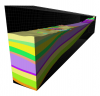
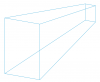
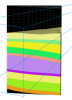
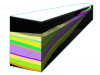
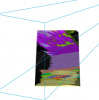
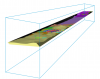
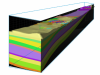
Here are the two images i want to transpose separately.
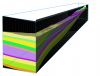
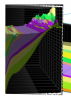
Also below.. a version which i remapped via 'vanishing point'. I got the sides to remap to the new perspective... but i could get the same result cutting the faces into separate layers and transforming.

I realise that the top of the original 3d box in this instance is not shown.. hence in theory we should just have a blurr of pixels... but that is okay... i only need it as I have to redraw/stylise a bunch of these types of images but want them all on the same perspective and same X/Y exaggeration if necessary.

Screen shot 2012-03-23 at 9.25.27 AM.pngScreen shot 2012-03-23 at 9.25.33 AM.pngScreen shot 2012-03-23 at 9.25.07 AM.png

The thing is... forget about it being a 3D object.. say I have one of those 2D skewed faces on it's own layer... and I want to transform each corner of the Quadrilateral *importantly* from the point/corner to map to the new face. Not from an imaginery rectangle marquee with handles at right angles, but from nodes which I dictate. This should be straight forward Id imagine? If using a path.. it should tell sides whether they are straight or curved. I just dont get why it wont play nice. I've never spent so much time trying to figure out a seeming simple problem.:banghead::banghead::banghead:
 
Last edited:
the transform tool will place it where it needs to be, you'll need to use skew, scale and warp

btw it's not so simple
 
Yes, Im starting to think it may not be so simple.

On another forum I saw someone ask the question in a much more coherrant manner than my babble... a Q&A below:

Hello,

I usually distort my image with the classic skew, rotate, scale... tools but
that time I really need to deform the image along a path.
So I want to draw a path (selection) and distort the image along it.
For example, I draw somekind of recipient:
/ \
\ /
and I want the image to look like if it was put into that repicient (bottle
effect)
...
Hope you can help me!,

Adobe Illustrator can do path warping (its called envelope warping in Illustrator). I just tried it and it can warp pixels within a path like you are wanting.


Ill have a play in illustrator and see hows I go
 
For what it's worth... this is possibly the closest thing to the control I want. I can dictate the grid to be whatever I choose.
This is MUCH better than photoshop's Warp feature. (why this is in Illustrator but not Photoshop is beyond me).

It still doesn't achieve the result I want. I still would prefer to be able to dictate where precisely the nodes/points are which I choose to drag (but Im probably overlooking some Einstein physics stuff about warping the 4th dimension or something)
Screen shot 2012-03-23 at 10.33.04 AM.png
 
try approaching by manipulating the box to fit the flowing image, just a thought instead of the other way around
 
yes, or if i first distort each face to be square and then hit transform from there perhaps.
At this stage I can probably make do with the result I achieved from 'vanishing point' but i'm on a wild goose chase for something which I dont think exists. (ie. Warp Path and Pixels at same time). Maybe i need some alien technology or something to achieve this.
 
you already have the shape, just build the box to fit using pentool?
 
okay.. i got the control i wanted by cutting each face.. and then roughly distorting the skewed shape to an oblong with roughly square corners.

I could then use Distort with the precision I demand. of course I could get the same result (if not better because less distorted) by not first distorting the initial object square.. but At least I get that control. I just wish there was a way that it could know (based around a path I guess) that certain nodes behaved like vectors, and could warp the content pixels to suit.

Screen shot 2012-03-23 at 10.53.56 AM.pngScreen shot 2012-03-23 at 10.53.37 AM.pngScreen shot 2012-03-23 at 10.53.32 AM.png

I could probably get the top remapped then too using this method.. but i probably dont need to.
 
Awww snap. Its amazing how much you can distort a face (ie in the first image to roughly rectangular) and then re-distort to suit my perspective plane.. and it still maintains some legibility.

This should suffice for the purpose, as it is being redrawn manually..

Screen shot 2012-03-23 at 11.00.58 AM.pngScreen shot 2012-03-23 at 11.01.29 AM.pngScreen shot 2012-03-23 at 11.03.01 AM.png
 

Back
Top