
Hey folks, I'm having trouble with some web graphics and it's holding me back badly, I was just wandering if anyone could help!
This is the first time I've encountered this problem rather weirdly but here it is.
I've been working on this graphic for my site...it looks like this in photoshop (cs4):
 I have added some 'noise filter' and a little drop shadow...I'm saving it as .png to preserve the transparency...
This is how it comes out on my website tho:
 The difference is shocking and totally not handy for efficient design. I googled the problem and found that it may have something to do with my colour settings which look like this:
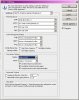 But no matter how I tweak them with 'preview on' it doesn't seem to make much difference at all. I was hoping one of the settings might magically make the photoshop view look like the image I get when I post it to my site but nothing seems to work. I'm a bit stuck and would appreciate any help! Thanks.
This is the first time I've encountered this problem rather weirdly but here it is.
I've been working on this graphic for my site...it looks like this in photoshop (cs4):
I have added some 'noise filter' and a little drop shadow...I'm saving it as .png to preserve the transparency...This is how it comes out on my website tho:
The difference is shocking and totally not handy for efficient design. I googled the problem and found that it may have something to do with my colour settings which look like this:But no matter how I tweak them with 'preview on' it doesn't seem to make much difference at all. I was hoping one of the settings might magically make the photoshop view look like the image I get when I post it to my site but nothing seems to work. I'm a bit stuck and would appreciate any help! Thanks.
