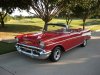
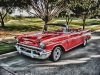
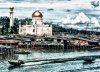
What's new
Photoshop Gurus Forum

Welcome to Photoshop Gurus forum. Register a free account today to become a member! It's completely free. Once signed in, you'll enjoy an ad-free experience and be able to participate on this site by adding your own topics and posts, as well as connect with other members through your own private inbox!

i want this effect?


d_animality

Well-Known Member
Messages
83
Likes
6
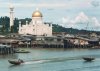
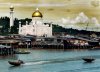
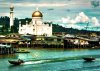
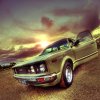
Hello all im back for more to learn... i saw some of my country's blogger... most of his picture looks stunning because of this effect (attached pic 1).. can somebody teach me how to make such effect? i provide another pic (attached pic 2) with no effect for trying..3924e338571511e18bb812313804a181_7.jpgKampungAyer.jpg

it would be helpful if somebody can help so i can make more beautiful pictures with such effects :)
 
the first is probably an HDR. Document on this.
For a real HDR you need a few images on a tripod with different exposures.
So you can catch both the shadows and the highlights of the scene.
 
The first picture was taken with wide angle lens and the effect is HDR (High Dynamic Range) - there are many tutorials how to do that.
The second picture... - as Dataflow say - "can you describe what effect you mean"
 
sorry not to put in detail... the effect i mean is the colour on the first picture... it looks like its been transformed into cartoon but realistic... the colour made it looks so good... not the wide lens effect sorry.. hope this helps clarify what i meant.. thanks
 
Have you tried to change the levels for this picture and save 3 different ones, so that you can do a Merge to HDR? Also, on one of them you could do a colorise to green and blend it with Soft Overlay.
 
what i notice from the picture of the car is the colour of the sky... as well as the texture of the ground so detail ... its like being sharpened... how do u do that?
 
you cant make the image you posted look like the pic of the car.
you can try adding the same effect but it still wouldnt look like the image so its not going to look like the same effect.
you need to find a better image
 
I agree with Dataflow. It will be difficult to make that image look like that. You can get some of those colors or tones but probably not in a similar way since the range and tones of this image is completely different. However an HDR approach should give you something a bit like this possibly.
05.jpg
 
Every poster above has something important to say. You are getting good advice d_animality, but I think your training and experience do not allow you to understand fully.

You are right that the color of the car contributes to its "cartoon" look. However, it is a combination of all of the effects, the fish eye, the skewed color balance, the HDR, the sharpness of detail, and the subject matter. HDR will increase sharpness for one thing. Another way to get this kind of sharpening is to use the high pass filter. Other possibilities for the ground may be that there are texture and color overlays and filters added, like clouds. You may need selective transformations. And by the way, it's quite possible the car is not part of the original photo.

There are tutorials that are devoted to automotive transformations alone and can produce similar results. You can change the lighting with an HDR toning effect -- which can be done in PS CS5 now without the 3 exposures (though I think that is a better way), you can sharpen the foreground, the water, beyond what the HDR toning will do, and you can play with the color balance. As for making it cartoonish, you definitely have the wrong kind of image. The wide angle does add to that effect.

Color balance, curves, levels, overlays, blend modes, methods of sharpening, these are some of the things you should work with and learn before you attempt to reproduce that great car image. And I think it is a very cool picture and I can understand why you want to reproduce the effects.

 
Every poster above has something important to say. You are getting good advice d_animality, but I think your training and experience do not allow you to understand fully.

You are right that the color of the car contributes to its "cartoon" look. However, it is a combination of all of the effects, the fish eye, the skewed color balance, the HDR, the sharpness of detail, and the subject matter. HDR will increase sharpness for one thing. Another way to get this kind of sharpening is to use the high pass filter. Other possibilities for the ground may be that there are texture and color overlays and filters added, like clouds. You may need selective transformations. And by the way, it's quite possible the car is not part of the original photo.

There are tutorials that are devoted to automotive transformations alone and can produce similar results. You can change the lighting with an HDR toning effect -- which can be done in PS CS5 now without the 3 exposures (though I think that is a better way), you can sharpen the foreground, the water, beyond what the HDR toning will do, and you can play with the color balance. As for making it cartoonish, you definitely have the wrong kind of image. The wide angle does add to that effect.

Color balance, curves, levels, overlays, blend modes, methods of sharpening, these are some of the things you should work with and learn before you attempt to reproduce that great car image. And I think it is a very cool picture and I can understand why you want to reproduce the effects.

thanks for the advices everyone... so how to do the HDR effect on photoshop? and yeap its so cool and made me wanna do it straight away... i was told that the guy only using iPhone application to do it... gonna have to look for that apps :) if anybody ever come to it..

Apa Khabar, d_animality.

You can try the TOPAZ filter .

wow!! u can speak my language... where did u learn that? anyway, khabar baik ... can u explain more about the TOPAZ filter?
 
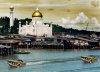
I use topaz adjust 5 however I have my own presets This started off with the psychadelic preset and then tweaked the sliders. I always use topaz on a duplicate layer and adjust blending modes and opacity then I masked off the trees so they were not so blown out flattened the image duplicated it again and pulled up Nik HDT EFFEX Pro to add some HDR toning to it
 
I gotta get the full license TOPAZ....

I like the way topaz makes an image look like a painting. With a little bit more tweaking you can make that Bruneian Water Village scene look oil on canvas.
 
Last edited:

Back
Top