Every poster above has something important to say. You are getting good advice d_animality, but I think your training and experience do not allow you to understand fully.
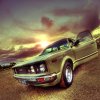
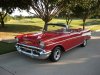
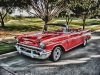
You are right that the color of the car contributes to its "cartoon" look. However, it is a combination of all of the effects, the fish eye, the skewed color balance, the HDR, the sharpness of detail, and the subject matter. HDR will increase sharpness for one thing. Another way to get this kind of sharpening is to use the high pass filter. Other possibilities for the ground may be that there are texture and color overlays and filters added, like clouds. You may need selective transformations. And by the way, it's quite possible the car is not part of the original photo.
There are tutorials that are devoted to automotive transformations alone and can produce similar results. You can change the lighting with an HDR toning effect -- which can be done in PS CS5 now without the 3 exposures (though I think that is a better way), you can sharpen the foreground, the water, beyond what the HDR toning will do, and you can play with the color balance. As for making it cartoonish, you definitely have the wrong kind of image. The wide angle does add to that effect.
Color balance, curves, levels, overlays, blend modes, methods of sharpening, these are some of the things you should work with and learn before you attempt to reproduce that great car image. And I think it is a very cool picture and I can understand why you want to reproduce the effects.