What's new
Photoshop Gurus Forum

Welcome to Photoshop Gurus forum. Register a free account today to become a member! It's completely free. Once signed in, you'll enjoy an ad-free experience and be able to participate on this site by adding your own topics and posts, as well as connect with other members through your own private inbox!

Bevel only in certain areas


MarsBars439

Member
Messages
6
Likes
0
Hi all,

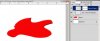
Please use this picture as reference to my question:
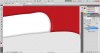
help.jpg

I want to have the bevel only where the white touches the red, and no effect along the side touching the transparency. I don't want to do a crude select, layer via copy, then just remove bevel because the shading then becomes shoddy and it looks unprofessional. Thanks for your help!
 
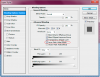
After you apply the layer style, place the effects on their own layer. ( Layer-Layer Style-Create Layer ) Then add a layer mask and remove the style wherever you wish.
 

Attachments

  • ScreenShot001.jpg
    ScreenShot001.jpg
    42.8 KB · Views: 1
After you apply the layer style, place the effects on their own layer. ( Layer-Layer Style-Create Layer ) Then add a layer mask and remove the style wherever you wish.


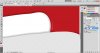
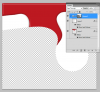
Thanks for your help. However, when I do this, it creates the same crude corners as the way I was doing it before. You can see in the picture that I eliminated the bevel on the red, but you can still see the shadow on the left, where it touches the white. If there were truly no bevel against the transparency, this would be a highlight all the way down. Does that make sense?

help2.jpg
 

Back
Top