What's new
Photoshop Gurus Forum

Welcome to Photoshop Gurus forum. Register a free account today to become a member! It's completely free. Once signed in, you'll enjoy an ad-free experience and be able to participate on this site by adding your own topics and posts, as well as connect with other members through your own private inbox!

Could you confirm this bug please


PutinHuilo

Well-Known Member
Messages
70
Likes
0
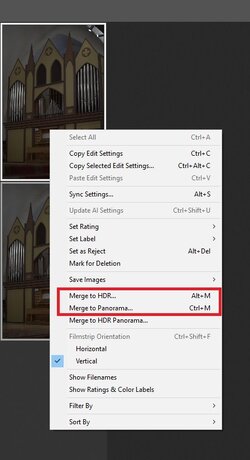
Could you please confirm this bug and possibly upvote on adobe forum i've been facing this since 2023.


When using Merge to HDR and Merge to Panorama option Update embedded JPEG previw = Full Size is ignored ACR saves resulting DNG with embedeed JPEG preview only 256x256 pixels.

Even later when that Panorama / HDR image is opened back and changed in ACR preview updates only to max 256x256 pixels depsite option Update embedded JPEG previw = Full Size.

1.jpg

2.jpg
 
Well, I tried a Merge to HDR and followed all the steps, including updating the preview sizes in the DNG, but the maximum preview dimensions were 256 pixels.

Yet the link you provided brought me to the Adobe Community page, which looked like it had no access.

So not sure what to do at this point

John Wheeler

1767671416256.png
 
I upvoted and also added my own post to the thread copied here for what its worth:

Confirmed still a problem with Photoshop 2025 and ACR 17.2


This bug has been around for a long time.


It would be great if Adobe at least acknowledged this as a bug, even if it is low on their priority list to fix.


In addition, providing an Adobe workaround would be very helpful instead of having to use a non-Adobe app to correct this problem.


I certainly hope that the length of time on the low-priority bug list would eventually bump the priority for a real fix.


Just a suggestion from a retired engineering manager which including managing software.


John Wheeler
 
Maybe it's not a bug...maybe it's a feature... :thinking:
:joy::joy::joy: There were some Photoshop bugs back in the day , when I was interfacing with an Adobe employee working with me on some PS bugs. On one of them, he used almost the exact same wording: "intended to be that way to protect the customer." Yet they fixed it in the next revision. Makes me wonder if some companies have their employees go through "gaslighting" training. :silly:
 
In addition, providing an Adobe workaround would be very helpful instead of having to use a non-Adobe app to correct this problem.
Is there a way to correct preview size with any non adobe app?

I mean ideally to correct once so next time when edits are made using ACR it update preview full size JPG preview, not 256x256 again.
 
There are a variety of ways and I have not checked them all out. For batch operations, it indicates using DNG converter is most reliable. Here is the online summary:

To correct small JPEG preview sizes inside DNG files, you need to regenerate a larger embedded preview and write it back into the DNG. The problem usually occurs when software (such as Adobe Camera Raw HDR/Panorama merge) embeds only a 256×256-pixel preview even when “Full Size” is selected. Fixing it requires rebuilding the preview using one of the following methods.


Method 1: Lightroom Classic. Import or select the DNG files. In the Library module, choose “Previews” and then “Build 1:1 Previews.” This forces Lightroom to generate a full-resolution JPEG preview. If another application needs the larger preview stored inside the file, you can optionally re-export the image as DNG.


Method 2: Adobe DNG Converter. Convert the DNG to DNG again. In the preferences, enable “Embed Fast Load Data” and set “JPEG Preview: Full Size.” The converter rewrites the DNG and replaces the small preview with a larger one.


Method 3: ExifTool replacement. ExifTool cannot generate a new preview image, but it can replace the small one if you supply a full-size JPEG. First extract the existing preview using “exiftool -b -PreviewImage input.dng > preview.jpg” to confirm it is small. Then create a full-size JPEG from your processed version of the file and write it back using “exiftool -PreviewImage=fullsize.jpg input.dng”. To verify the result, read the dimensions using “exiftool -PreviewImageWidth -PreviewImageHeight input.dng.”


If a viewer continues to display the old small preview after the fix, it may be using a cached thumbnail. Closing and reopening the application or clearing its cache usually resolves that.

Hope that is helpful
John Wheeler
 
Hi @PutinHuilo
I saw on the Adobe Community page for this reported bug and it has just been marked as solved.
Can you verify that it is solved.
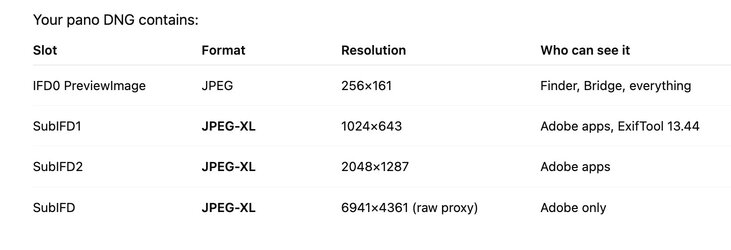
I could take your starting DNG image and confirm that going in it had several embedded images per using the EXIFTOOL in terminal on my Mac:
Screenshot 2026-01-09 at 8.50.54 PM.jpg

However, when I take the DNG, duplicate it, and use the Merge to HDR within ACR, and then ask ACR to rebuild the large previews, and output the file and rerun the EXIFTOOL, I am not finding the larger files. If you believe the issue is resolved I will just leave it be yet was double checking with you.
John Wheeler
 
Great, adobe answered and marked their answer as "accepted solution" :) it was not me who accepted that answer. See my response in the adobe forum.

And the answer reads:
There is no bug here.

"Merge To" results have their internal previews existing in two flavors. The minimum preview (Thumbnail) is 256px and exists in a format readable to most 3rd-party software. The large preview has been in the JXL format for several years now.

Engineering has confirmed that both test files, which I created and the file you attached here, contain the larger preview. What is likely happening is that your 'viewer' software does not support the JXL full-sized preview format embed

What command you used with ExifTool to get that "Your Photo DNG contains" table, i was only able to extract with ExifTool the tiny JXL 1024x643 and PreviewImage 256x161.
 
Last edited:
I saw that answer from Adobe. I too confirmed th
Great, adobe answered and marked their answer as "accepted solution" :) it was not me who accepted that answer. See my response in the adobe forum.

And the answer reads:


What command you used with ExifTool to get that "Your Photo DNG contains" table, i was only able to extract with ExifTool the tiny JXL 1024x643 and PreviewImage 256x161.

I guess my question is: Did you verify that when you put a DNG through Merge to HDR or Meger to Panorama, and then requested a save to DNG with the larger preivew, did you check with an image viewer that is know to extract the JXL (JPEG XL) images and they have a larger preview than the 256x256 pixel size. It was not clear to me that the person marking the issue as "solved" actually took those full steps?
 
Great, adobe answered and marked their answer as "accepted solution" :) it was not me who accepted that answer. See my response in the adobe forum.

And the answer reads:


What command you used with ExifTool to get that "Your Photo DNG contains" table, i was only able to extract with ExifTool the tiny JXL 1024x643 and PreviewImage 256x161.
Sorry, I missed your last post. The exiftool command that I used on my system was:

exiftool -a -G1 -s -u "/Users/johnwheeler/Downloads/DSC06858-Pano copy-HDR.dng" | egrep -i "subifd|imagewidth|imageheight|preview|thumbnail|embedded|otherimage|compression|jxl"

which extracted all the image or image like information from the file and here is the full result lilst:


[IFD0] ImageWidth : 256


[IFD0] ImageHeight : 161


[IFD0] Compression : JPEG


[IFD0] PreviewImageStart : 138188


[IFD0] PreviewImageLength : 20835


[IFD0] PreviewApplicationName : Adobe Photoshop Camera Raw


[IFD0] PreviewApplicationVersion : 17.2


[IFD0] PreviewSettingsDigest : e184876906ab9af6e448bc1cd46ed749


[IFD0] PreviewColorSpace : sRGB


[IFD0] PreviewDateTime : 2026:01:09 20:29:04-07:00


[IFD0] PreviewImage : (Binary data 20835 bytes, use -b option to extract)


[SubIFD] SubfileType : Full-resolution image


[SubIFD] ImageWidth : 6941


[SubIFD] ImageHeight : 4361


[SubIFD] BitsPerSample : 16 16 16


[SubIFD] Compression : JPEG XL


[SubIFD] PhotometricInterpretation : Linear Raw


[SubIFD] SamplesPerPixel : 3


[SubIFD] PlanarConfiguration : Chunky


[SubIFD] TileWidth : 416


[SubIFD] TileLength : 400


[SubIFD] TileOffsets : (Binary data 1654 bytes, use -b option to extract)


[SubIFD] TileByteCounts : (Binary data 1308 bytes, use -b option to extract)


[SubIFD] SampleFormat : Float; Float; Float


[SubIFD] BlackLevelRepeatDim : 1 1


[SubIFD] BlackLevel : 0 0 0


[SubIFD] WhiteLevel : 32768 32768 32768


[SubIFD] DefaultScale : 1 1


[SubIFD] DefaultCropOrigin : 0 0


[SubIFD] DefaultCropSize : 6941 4361


[SubIFD] AntiAliasStrength : 1


[SubIFD] BestQualityScale : 1


[SubIFD] ActiveArea : 0 0 4361 6941


[SubIFD] NoiseProfile : 0.000687748531319142 5.83330741558137e-07 0.000692329289692531 5.89689540489987e-07 0.000639478141451133 5.80133879261019e-07


[SubIFD] JXLDistance : 0.5


[SubIFD] JXLEffort : 7


[SubIFD] JXLDecodeSpeed : 4


[SubIFD1] SubfileType : Transparency mask


[SubIFD1] ImageWidth : 6941


[SubIFD1] ImageHeight : 4361


[SubIFD1] BitsPerSample : 8


[SubIFD1] Compression : JPEG XL


[SubIFD1] PhotometricInterpretation : Transparency Mask


[SubIFD1] SamplesPerPixel : 1


[SubIFD1] PlanarConfiguration : Chunky


[SubIFD1] TileWidth : 992


[SubIFD1] TileLength : 880


[SubIFD1] TileOffsets : (Binary data 314 bytes, use -b option to extract)


[SubIFD1] TileByteCounts : (Binary data 141 bytes, use -b option to extract)


[SubIFD1] JXLDistance : 0


[SubIFD1] JXLEffort : 1


[SubIFD1] JXLDecodeSpeed : 4


[SubIFD2] SubfileType : Reduced-resolution image


[SubIFD2] ImageWidth : 1024


[SubIFD2] ImageHeight : 643


[SubIFD2] BitsPerSample : 8 8 8


[SubIFD2] Compression : JPEG XL


[SubIFD2] PhotometricInterpretation : RGB


[SubIFD2] PreviewJXLStart : 159024


[SubIFD2] SamplesPerPixel : 3


[SubIFD2] RowsPerStrip : 643


[SubIFD2] PreviewJXLLength : 83837


[SubIFD2] PlanarConfiguration : Chunky


[SubIFD2] PreviewApplicationName : Adobe Photoshop Camera Raw


[SubIFD2] PreviewApplicationVersion : 17.2


[SubIFD2] PreviewSettingsDigest : e184876906ab9af6e448bc1cd46ed749


[SubIFD2] PreviewColorSpace : sRGB


[SubIFD2] PreviewDateTime : 2026:01:09 20:29:04-07:00


[SubIFD2] JXLDistance : 2


[SubIFD2] JXLEffort : 7


[SubIFD2] JXLDecodeSpeed : 4


[SubIFD2] PreviewJXL : (Binary data 83837 bytes, use -b option to extract)


[SubIFD3] SubfileType : Reduced-resolution image


[SubIFD3] ImageWidth : 6930


[SubIFD3] ImageHeight : 4354


[SubIFD3] BitsPerSample : 8 8 8


[SubIFD3] Compression : JPEG XL


[SubIFD3] PhotometricInterpretation : RGB


[SubIFD3] PreviewJXLStart : 242862


[SubIFD3] SamplesPerPixel : 3


[SubIFD3] RowsPerStrip : 4354


[SubIFD3] PreviewJXLLength : 4090190


[SubIFD3] PlanarConfiguration : Chunky


[SubIFD3] PreviewApplicationName : Adobe Photoshop Camera Raw


[SubIFD3] PreviewApplicationVersion : 17.2


[SubIFD3] PreviewSettingsDigest : e184876906ab9af6e448bc1cd46ed749


[SubIFD3] PreviewColorSpace : sRGB


[SubIFD3] PreviewDateTime : 2026:01:09 20:29:04-07:00


[SubIFD3] JXLDistance : 2


[SubIFD3] JXLEffort : 7


[SubIFD3] JXLDecodeSpeed : 4


[SubIFD3] PreviewJXL : (Binary data 4090190 bytes, use -b option to extract)

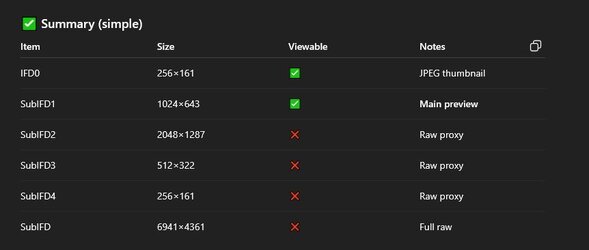
To make life easier I too the list of information and asked ChatGPT to summarize the image from that information to give the table shared with you.

It was the SUBIFD2 tags that had the larger image. I did not take any steps to extract it.
Hope that heps

John Wheeler

 
exiftool -a -G1 -s -u "/Users/johnwheeler/Downloads/DSC06858-Pano copy-HDR.dng" | egrep -i "subifd|imagewidth|imageheight|preview|thumbnail|embedded|otherimage|compression|jxl"

I got following info from ChatGPT when supplied data from above command.

1.jpg
This confirms with me trying to extract all previews and i got JXL that was just 1024x643 and other files are not previews but raw image itself.

Seems like ACR generated Panorama/HDR DNG file contains no full size preview even 1024x643 JXL is not even full screen thing and JXL previews are not supported in any image viewers i am aware of.


From what i understand Adobe insist ACR generated Panorama is already lossy format JPG (JXL) that's why no point to embed full size JPG preview, however i dont agree with that, check my response in the adobe forum.
 
Last edited:

Back
Top