Great, adobe answered and marked their answer as "accepted solution"

it was not me who accepted that answer. See my response in the adobe forum.
And the answer reads:
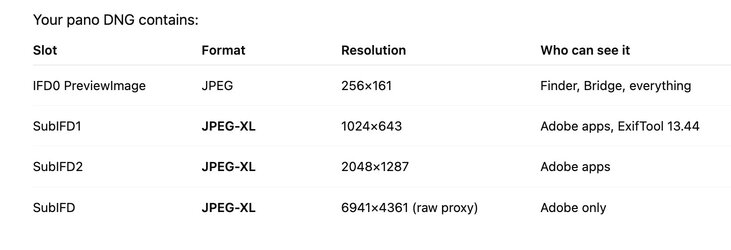
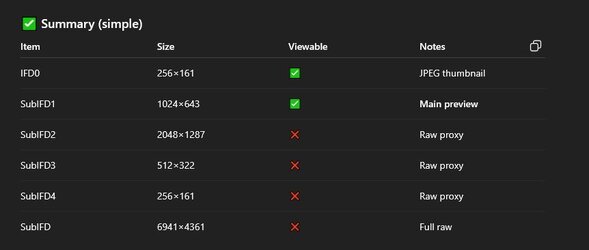
What command you used with ExifTool to get that "Your Photo DNG contains" table, i was only able to extract with ExifTool the tiny JXL 1024x643 and PreviewImage 256x161.
Sorry, I missed your last post. The exiftool command that I used on my system was:
exiftool -a -G1 -s -u "/Users/johnwheeler/Downloads/DSC06858-Pano copy-HDR.dng" | egrep -i "subifd|imagewidth|imageheight|preview|thumbnail|embedded|otherimage|compression|jxl"
which extracted all the image or image like information from the file and here is the full result lilst:
[IFD0] ImageWidth : 256
[IFD0] ImageHeight : 161
[IFD0] Compression : JPEG
[IFD0] PreviewImageStart : 138188
[IFD0] PreviewImageLength : 20835
[IFD0] PreviewApplicationName : Adobe Photoshop Camera Raw
[IFD0] PreviewApplicationVersion : 17.2
[IFD0] PreviewSettingsDigest : e184876906ab9af6e448bc1cd46ed749
[IFD0] PreviewColorSpace : sRGB
[IFD0] PreviewDateTime : 2026:01:09 20:29:04-07:00
[IFD0] PreviewImage : (Binary data 20835 bytes, use -b option to extract)
[SubIFD] SubfileType : Full-resolution image
[SubIFD] ImageWidth : 6941
[SubIFD] ImageHeight : 4361
[SubIFD] BitsPerSample : 16 16 16
[SubIFD] Compression : JPEG XL
[SubIFD] PhotometricInterpretation : Linear Raw
[SubIFD] SamplesPerPixel : 3
[SubIFD] PlanarConfiguration : Chunky
[SubIFD] TileWidth : 416
[SubIFD] TileLength : 400
[SubIFD] TileOffsets : (Binary data 1654 bytes, use -b option to extract)
[SubIFD] TileByteCounts : (Binary data 1308 bytes, use -b option to extract)
[SubIFD] SampleFormat : Float; Float; Float
[SubIFD] BlackLevelRepeatDim : 1 1
[SubIFD] BlackLevel : 0 0 0
[SubIFD] WhiteLevel : 32768 32768 32768
[SubIFD] DefaultScale : 1 1
[SubIFD] DefaultCropOrigin : 0 0
[SubIFD] DefaultCropSize : 6941 4361
[SubIFD] AntiAliasStrength : 1
[SubIFD] BestQualityScale : 1
[SubIFD] ActiveArea : 0 0 4361 6941
[SubIFD] NoiseProfile : 0.000687748531319142 5.83330741558137e-07 0.000692329289692531 5.89689540489987e-07 0.000639478141451133 5.80133879261019e-07
[SubIFD] JXLDistance : 0.5
[SubIFD] JXLEffort : 7
[SubIFD] JXLDecodeSpeed : 4
[SubIFD1] SubfileType : Transparency mask
[SubIFD1] ImageWidth : 6941
[SubIFD1] ImageHeight : 4361
[SubIFD1] BitsPerSample : 8
[SubIFD1] Compression : JPEG XL
[SubIFD1] PhotometricInterpretation : Transparency Mask
[SubIFD1] SamplesPerPixel : 1
[SubIFD1] PlanarConfiguration : Chunky
[SubIFD1] TileWidth : 992
[SubIFD1] TileLength : 880
[SubIFD1] TileOffsets : (Binary data 314 bytes, use -b option to extract)
[SubIFD1] TileByteCounts : (Binary data 141 bytes, use -b option to extract)
[SubIFD1] JXLDistance : 0
[SubIFD1] JXLEffort : 1
[SubIFD1] JXLDecodeSpeed : 4
[SubIFD2] SubfileType : Reduced-resolution image
[SubIFD2] ImageWidth : 1024
[SubIFD2] ImageHeight : 643
[SubIFD2] BitsPerSample : 8 8 8
[SubIFD2] Compression : JPEG XL
[SubIFD2] PhotometricInterpretation : RGB
[SubIFD2] PreviewJXLStart : 159024
[SubIFD2] SamplesPerPixel : 3
[SubIFD2] RowsPerStrip : 643
[SubIFD2] PreviewJXLLength : 83837
[SubIFD2] PlanarConfiguration : Chunky
[SubIFD2] PreviewApplicationName : Adobe Photoshop Camera Raw
[SubIFD2] PreviewApplicationVersion : 17.2
[SubIFD2] PreviewSettingsDigest : e184876906ab9af6e448bc1cd46ed749
[SubIFD2] PreviewColorSpace : sRGB
[SubIFD2] PreviewDateTime : 2026:01:09 20:29:04-07:00
[SubIFD2] JXLDistance : 2
[SubIFD2] JXLEffort : 7
[SubIFD2] JXLDecodeSpeed : 4
[SubIFD2] PreviewJXL : (Binary data 83837 bytes, use -b option to extract)
[SubIFD3] SubfileType : Reduced-resolution image
[SubIFD3] ImageWidth : 6930
[SubIFD3] ImageHeight : 4354
[SubIFD3] BitsPerSample : 8 8 8
[SubIFD3] Compression : JPEG XL
[SubIFD3] PhotometricInterpretation : RGB
[SubIFD3] PreviewJXLStart : 242862
[SubIFD3] SamplesPerPixel : 3
[SubIFD3] RowsPerStrip : 4354
[SubIFD3] PreviewJXLLength : 4090190
[SubIFD3] PlanarConfiguration : Chunky
[SubIFD3] PreviewApplicationName : Adobe Photoshop Camera Raw
[SubIFD3] PreviewApplicationVersion : 17.2
[SubIFD3] PreviewSettingsDigest : e184876906ab9af6e448bc1cd46ed749
[SubIFD3] PreviewColorSpace : sRGB
[SubIFD3] PreviewDateTime : 2026:01:09 20:29:04-07:00
[SubIFD3] JXLDistance : 2
[SubIFD3] JXLEffort : 7
[SubIFD3] JXLDecodeSpeed : 4
[SubIFD3] PreviewJXL : (Binary data 4090190 bytes, use -b option to extract)
To make life easier I too the list of information and asked ChatGPT to summarize the image from that information to give the table shared with you.
It was the SUBIFD2 tags that had the larger image. I did not take any steps to extract it.
Hope that heps
John Wheeler