What's new
Photoshop Gurus Forum

Welcome to Photoshop Gurus forum. Register a free account today to become a member! It's completely free. Once signed in, you'll enjoy an ad-free experience and be able to participate on this site by adding your own topics and posts, as well as connect with other members through your own private inbox!

A request


Christopher

Member
Messages
7
Likes
0
[FONT=Tahoma, Calibri, Verdana, Geneva, sans-serif]Hello. How do you do? I am Christopher. I need a little help.

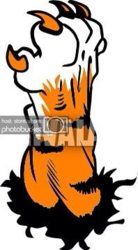
What I need is the head of the Tiger tilted up a few degrees..... and a paw inserted into the graphic as if the tiger is yawning... and the paw is politely covering the yawning mouth.

This is what I have to work with so far.

72b12fac.jpg

0d09b002.jpg

f86ed1a9.jpg

Thanks!
[/FONT]
 
you can use the various transform methods like distort/perspective/skew etc to arrange the paw so it looks like you want.

EDIT: you said you needed help so i am assuming you have PS.
 
That looks good Christopher.

Finally someone who comes to us for help and takes the time to learn hw to do it on their wn. I think speak for the whole furm when I say thank you.
 
That looks good Christopher.

Finally someone who comes to us for help and takes the time to learn hw to do it on their wn. I think speak for the whole furm when I say thank you.

true dat man. it was tuning into a request forum rather than a help forum.

@OP good work with the yawn and the placement of the paw is nice. looking really nice.
 
Good job, you might consider painting over the black line and painting in some more stripes on the arm, something like this. Don't forget to use layers.
 

Attachments

  • b35baef3.jpg
    b35baef3.jpg
    17.7 KB · Views: 14

Back
Top