
I have a comic that has bad scanning with pictures like 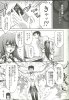 where you can see that a little bit of the righthand side is blurry. On some of the pages in this comic, there are pieces of text that lie within the blurry zone (they can still be read, but they're blurry). It is not possible for the source to be scanned again, so I am wondering if there is some sort of editing solution. I would greatly appreciate any assistance in resolving this issue. Thanks.
where you can see that a little bit of the righthand side is blurry. On some of the pages in this comic, there are pieces of text that lie within the blurry zone (they can still be read, but they're blurry). It is not possible for the source to be scanned again, so I am wondering if there is some sort of editing solution. I would greatly appreciate any assistance in resolving this issue. Thanks.