What's new
Photoshop Gurus Forum

Welcome to Photoshop Gurus forum. Register a free account today to become a member! It's completely free. Once signed in, you'll enjoy an ad-free experience and be able to participate on this site by adding your own topics and posts, as well as connect with other members through your own private inbox!

compostion of a car on a beach how to make it not fake


hansolo

Member
Messages
10
Likes
0
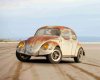
Hi i have an image of a car placed on a beach.

I think the shadow might be making the composition unrealistic
. As anyone got any advice
 

Attachments

  • car on beach.jpg
    car on beach.jpg
    88.9 KB · Views: 4
For starters, the fake blur of the foreground sand extends with minimal decrease in strength right up to the car, but the wheels of the car (right above the OOF sand) are in focus.

Also, there are also places along the underside of the body of the car (ie, where you cut out the car) that have a soft edge and hence look OOF, whereas the rest of the car is quite sharp.

To me, the above two issues are the first and most important things I notice about this composite.

We should deal with the shadow only *after* we deal with the above issues and establish the sharpness of the sand under the car.

Tom M
 
Zoe, your comment was not helpful because you didn't say what specific filter. In fact, it is not even correct to suggest this.

Photoshop's "photo filter" (as well as optical camera filters) change colors. They have absolutely nothing to do with the issues at hand, ie, correcting edges, shadows, fake blurs, etc. What exactly were you thinking when you make that comment?

Tom M
 
I completely agree with Tom here on his observations of the blur (OOF).

The shadow itself is too uniform, dark, and it is far too blurry. The best way to create shadows for cars is to use the cutout of the car itself. Create a new layer, Command + Click the cutout of the car, fill with black, use Command + T to transform the black cutout into the cars shadow. You may have to use the Warp feature as well. When you have the shadow where you like it, you can use a layer mask and the Gradient tool to fade the edges of the shadow. Of course you will have to lower its opacity.

This is a really fast (not perfect) demo.

Cutout Car on White BG..
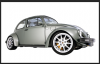
Screen Shot 2014-02-01 at 8.21.29 AM.png

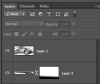
Layer below Car layer, Car cutout selection that's filled with black...
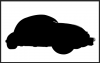
Screen Shot 2014-02-01 at 8.21.41 AM.png

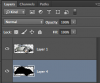
Here's the layers panel..
Screen Shot 2014-02-01 at 8.21.54 AM.png

Command + T to transform, rotate, and warp shadow....
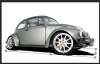
Screen Shot 2014-02-01 at 8.23.15 AM.png

Layer mask with gradient and lowered opacity on the shadow layer...
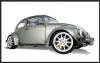
Screen Shot 2014-02-01 at 8.23.50 AM.png

Screen Shot 2014-02-01 at 8.24.01 AM.png
 

Back
Top