What's new
Photoshop Gurus Forum

Welcome to Photoshop Gurus forum. Register a free account today to become a member! It's completely free. Once signed in, you'll enjoy an ad-free experience and be able to participate on this site by adding your own topics and posts, as well as connect with other members through your own private inbox!

confused


cora21

Member
Messages
23
Likes
1
don't know whether this is supposed to be in this section. Sorry about last time. I am genuinely confused now i try to blur/smudge a colour on a transparent background and it just makes the part i'm trying to blur go black at the end :S if you don't know what i'm going on about i can get pictures of what is going on.
 
Last edited:
LOL... I was about to move and post images and help but the thread dissappered....


Anyways....

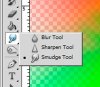
It seems that your strength is set to maximum. Depending on how you want it to look, lower it . And set the hardness to 0.

View attachment 13902 View attachment 13903

In using both tools, you have to familiarize yourself with how they respond with regards to the settings, brush sizes, to click or click plus drag, etc. .
 
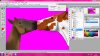
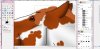
here is a picture, i am trying to smudge the mane but it goes back at the end. I accidentally drew some lines on it so they aren't important and i have the right tool and stuff (i think :P) @dv8_fx it was only on 50% strength and my brush was soft :P
horsecopy-1.jpg
 
Last edited:
here is the full screen, i thought that i could open the little box thing, i have no idea what it does though :P horse.jpg oops i think i clicked it twice :P anyway, i hope it helps :)
 
Last edited by a moderator:
I'm really dumbfounded by this one. With your settings that shouldn't be happening. Unless I missed something.

The only thing I could think of is to try to reset Photoshop.

Or... create a fresh file. link everything, create a new document , drag everything from horse file to new and save that.

Seems weird but when I was using PS6 before and had problems with the file, doing this sometimes fixed the problem for me.
 
how do i reset it?? i am just getting better at photoshop, i had it for a while but i didn't know how to use it so i was just on paint but now i understand it better, it still does the same on any document :S It's a bit confusing though :P thanks ibclare :)
 
I just had trouble with a corrupt file and I had to replace it with a new one and start over. Which doesn't mean as dv8 said, that you have to start from scratch.

To reset Photoshop, close the program. Hold down shift + ctl + alt (shift + cmd + opt for mac); keep them down and reopen PS. It will ask you if you want to make these changes and click OK.
 
it says something about scratch discs and when i press ok it just carries on loading, i think i see what you mean about the new file (where i just copy all thte layers onto a new canvas?) but it still does it :S
 
ok, i have decided to finish it on GIMP, because it can smudge/blur without making the part black but do you know if you can expand the selection thing, if you haven't used GIMP you can download it free. I'm not good at explaining, but you can only smudge within a box if you get what i'm sayingAgain.jpg
 
hm i'm clueless, perhaps a reinstal maybe would help....

Have you tried contact adobe about this issue? They might give you a fixed update or atleast explane what is going on....
 

Back
Top